Counter App

Nursing Unit Supply Inventory, Shift by Shift
Key takeaways
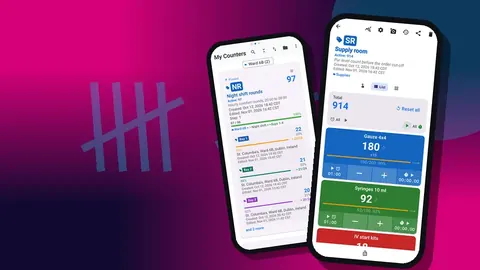
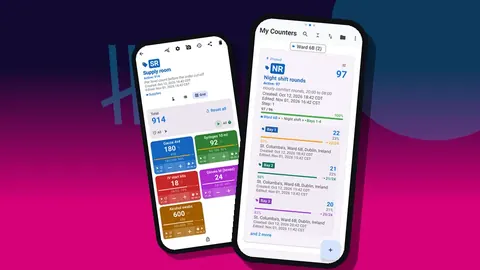
A nurse supply inventory routine with Counter App — Tally & Clicker uses one counter per station, cart or trolley, with each supply type as a tag whose target is its par level. Nurses do a quick count at shift start, reconcile with the history at shift end, and export Summary and Notes weekly for ordering.
- Nursing unit supply gaps usually open between shifts, when restocking falls through, borrowing goes unseen and damaged items leave the count unrecorded.
- Counter App — Tally & Clicker supports a shift-by-shift nursing supply routine with one counter per station or cart and one tag per supply type with its par level as the target.
- A short shift-start count in Grid view and an end-of-shift reconciliation with the timestamped history give the outgoing nurse a clear supply handover.
- A restock trigger in Counter App is a countdown target with an optional sound or vibration alert, and auto-lock can block further counting until someone restocks.
- Counter App is a unit-level counting aid that does not replace hospital materials management, charging or clinical documentation, and it must contain no patient information.
On a nursing unit, supplies are a shift problem before they are an inventory problem. A day shift that uses the last IV start kits at four in the afternoon leaves the evening team searching at seven. A night shift that never restocks the dressing cart hands the morning a cart that looks full from the front and is empty behind. The weekly order may be perfectly accurate and the unit still runs short, because the gaps open between shifts.
This article sets out a shift-by-shift routine on Android with Counter App by GiveMeMood: a counter per station, par levels as targets, a short count at the start of each shift, a reconciliation at the end, and an export for whoever orders.
Scope note: this is a unit-level counting aid. It does not replace your hospital's materials management system, charging processes or clinical documentation, and it must not contain any patient information.
Why Do Shift Boundaries Matter for Unit Supplies?
Each handover is a moment when responsibility changes and information gets lost. Supplies suffer the same fate as anything else not mentioned at handover. Three specific patterns cause most of the trouble:
- Restocking falls between shifts. Everyone assumes the other shift will do it.
- Borrowing is invisible. A nurse takes supplies from another station's cart and nobody notices until that station runs short.
- Damage and expiry go unreported. A torn pack is thrown away and the count is quietly wrong.
A routine tied to the shift boundary addresses all three, because the count happens at the exact moment responsibility changes.
Setup: One Counter per Station
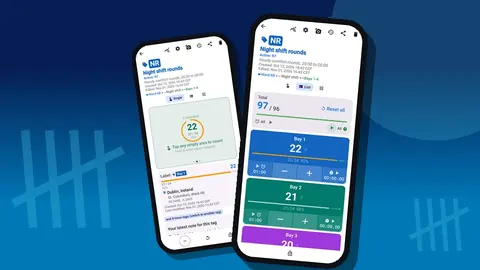
Make one counter for each place supplies are kept and used: the main supply room, each nurses' station, the dressing cart, the IV cart, the procedure trolley. Use the code field for a short badge such as "NS1" or "IVC".
Counters appear in the counter list in either List or Grid view, with search, a date-range filter and six sort orders. Pin the stations counted every shift so they stay at the top, and choose a sort order that matches the walking route.
Keep counters for satellite storage, such as a clean utility room, separate from the station counters. Mixing them makes it impossible to see which station actually needs restocking.
Tagging Supply Types
Inside each station counter, add a tag per supply type: gauze 4x4, syringes 10 ml, IV start kits, gloves by size, alcohol swabs, saline flushes, tape, dressing packs. Use the names printed on the bins in your unit.
Color helps across stations. If gloves are always one color and IV supplies another, a nurse covering a different station reads the screen instantly.
Set a step that matches how items leave the shelf. Single items are 1; boxes counted as boxes are 1 per box; supplies issued in bundles might use the bundle size. Each tag has its own step from 1 to 100.
Par Levels as Targets
A par level is the quantity a station should hold after restocking. Put it in each tag's target. The tag's progress bar then shows how close the station is to par, and the counter's total target sums the station as a whole.
Choose pars from what the unit actually uses on its busiest regular shift, plus a margin. Expect to revise them; the history after two weeks will show where they are wrong.
The Shift-Start Count
At the start of each shift, one nurse per station, or one designated person for the whole unit, does a quick count.
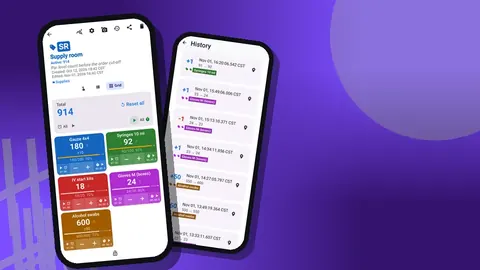
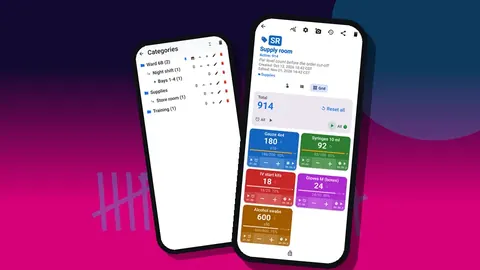
- Open the station's counter in Grid view. Each supply type is a colored tile with its value and target percentage.
- Look for tiles far below par first.
- Count those items and set their values; glance at the rest.
- Restock anything below an agreed threshold before patients need it.
- Add a note to the counter if something is unusual, such as "Bin for 10 ml syringes cracked, replaced".
This should take a few minutes per station. The point is not perfect accuracy; it is starting the shift knowing what is low.
Hands-Free Counting During the Shift
Tapping minus every time a supply is used gives the most current numbers, but it only works if it is easy. Two features help.
Volume buttons. When enabled in settings, the volume keys count up or down, also in the background and on the lock screen through a foreground service. Keys can be remapped, and each key can have its own sound and vibration. It is off by default, and some devices still display the system volume bar.
Lock-screen notification. A notification with minus, plus and Stop buttons lets you count without opening the app.
Many units decide that mid-shift tapping is optional and rely on the start and end counts instead. That is a reasonable compromise; agree on it explicitly so nobody assumes the numbers are live.
Restock Triggers
A restock trigger is the point where someone should go and fetch more. With targets, it can be built in.
If the station counts down as supplies are used, set the target to the restock level. When the value reaches it, an optional sound or vibration alert fires. Auto-lock can stop further counting until someone restocks and unlocks it, which makes the trigger hard to ignore. Auto-reset is the other option, starting the count again automatically once the goal is reached.
Keep alerts for the handful of supplies where running out causes real harm to the workflow. Alerts on every item quickly become noise.
How Do You Reconcile Supplies at the End of a Shift?
At the end of the shift, count again and compare with the start.
The history screen lists every change with its exact time, the step and the before-and-after values, along with tag labels and icons for notes and locations. Reading it top to bottom gives the outgoing nurse a short summary to hand over: what was used, what was restocked, what is still low.
Discrepancies are expected. If the end count is lower than the start minus recorded use, it usually means untapped use or borrowing. Add a note to the relevant event so the next shift and the weekly review can see it. Then lock each counter so the next shift starts from a clean, protected state.
Damaged and Expired Items
Damaged or expired items should leave the count with a reason. Decrement them and add a note to the event: "Two packs expired, removed" or "Sterile pack torn". If your unit keeps a log of such items for supply review, a separate counter called "Discarded" with matching tags makes the totals easy to export.
Photos can document damage if your policy allows it. Each tag can hold up to six photos, and the editor can add text or circle the problem. Keep photos to the item and its packaging.
Temporarily Unavailable Supplies
Backorders and product switches happen. When a supply is temporarily unavailable, set its target to zero and add a note with the substitute. That stops the progress bar from showing a permanent shortage and tells the next shift what to use instead. Restore the target once supply returns.
Exporting for Supply Ordering
Before the weekly order, open each station's dashboard: total against target, increments versus decrements, a seven-day activity chart and a pie chart by tag. A station that consistently ends its shifts far below par needs a higher par or more frequent restocking.
Then export. Formats are CSV, Excel (XLSX) and an HTML report with embedded photos. For ordering, Summary plus Notes in Excel is usually enough; include Events if someone wants to examine usage over time.
Several Rooms, Several Units
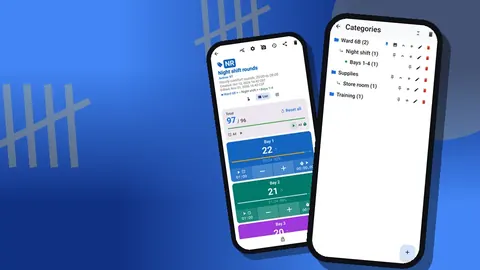
Larger setups use categories for structure. Categories nest up to three levels: Hospital → Ward 6B → Stations is one possibility. Each can have its own color and can be pinned or reordered, and deleted categories go to their own trash.
There is no live sync between phones. Units that use several phones should give each phone specific counters, then move data with a backup ZIP when needed. Before anything is imported, a preview lists the counters and asks how duplicates should be treated.
How Do You Get the Nursing Team to Use It?
The best routine on paper fails if the unit does not adopt it. Some approaches that tend to help:
- Start with one station. Pick the station that runs short most often. Success there persuades better than a unit-wide launch.
- Name a supply champion per shift. One person who owns the start and end counts removes the "someone else will do it" problem.
- Keep the phone in a fixed place. A shared phone that lives in a known spot at the station gets used. One that wanders does not.
- Show the result. After two weeks, bring the dashboard to a huddle and point out a shortage the counts predicted.
- Respect workload. Never let the counting routine compete with patient care. If a shift is overwhelmed, a skipped count is fine; note it and move on.
Adjust text size and theme so the screen is readable in low light on night shifts. The app offers light, dark and system modes, size presets and a font scale.
What This Does Not Replace
This routine does not replace materials management, patient charging, clinical documentation or any formal stock record your hospital requires. It is a fast, time-stamped tally that helps the unit see its own supplies shift by shift.
Related
For a full supply room setup, see our guide on organizing a clinic supply room. For counting audit tasks during a shift, see the guide on counting task frequency for shift audits.
Counter App is free to download with no ads; try it free for 3 days, then choose a yearly or monthly plan or a one-time lifetime purchase. Get the app at counterapp.online.
Frequently asked questions
Can a nurse count supplies while wearing clinical gloves?
Volume-button counting can help. Once switched on in settings, it works in the background and on the lock screen through a foreground service, with remappable keys, though a few phones still flash the system volume indicator.
Can each nursing station have its own supply par levels?
Yes. Make one counter per station and give each supply tag its own target and step.
How are supply counts handed over to the next nursing shift?
The history shows every count with its time, and notes on tags or events carry the context. Many units hand over on the same shared phone, since there is no live sync between phones.
Can nursing unit supply levels be exported for ordering?
Yes, as CSV, Excel (XLSX) or an HTML report; Summary plus Notes in Excel usually covers the weekly order.
Does a unit supply counter replace the hospital's materials management system?
No. Counter App is a counting aid for the unit, while ordering, charging and formal stock records stay in the organization's systems.
How should expired or damaged supply packs leave the count?
Decrement them with a note giving the reason, or move them to a separate "Discarded" counter with matching tags so the totals are easy to export.
What should a supply tag show when an item is on backorder?
Set its target to zero and add a note naming the substitute, then restore the target when the supply returns.