Counter App

A Clinic Manager's Supply Room Story (Hypothetical)
Key takeaways
This hypothetical story shows how a clinic manager might move supply counts from a clipboard to Counter App — Tally & Clicker. Shelving units become counters, items that run out become tags with targets, staff tap minus when they take stock, and a Friday review of notes and dashboards feeds an Excel export for purchasing.
- In this illustrative story, a small outpatient clinic replaces a supply clipboard with Counter App — Tally & Clicker on the front-desk work phone.
- A clinic manager can start a supply count small, with one counter per shelving unit and about a dozen tags for the items that actually run out.
- The Counter App history logs every count with its exact time and before-and-after value, which can explain a sudden stock drop such as kits lent to another clinic.
- Clinic staff notes in Counter App can sit on a counter, a tag or a single history event, and the All Notes screen gathers them for a weekly review.
- A phone counting app holds supply counts only; prices, suppliers and order history belong in the purchasing system, and patient information stays out of the app.
This is an illustrative story. Dana, her clinic and every number below are invented to show how a counting app might fit into a small clinic's week. It is not a case study and does not describe real results.
Monday Morning, Again
Picture a small outpatient clinic with four exam rooms, a treatment room and one supply room that everyone calls "the cupboard", even though it is a room. Dana manages the clinic. On Mondays she does the supply order.
Her method, until recently, was a clipboard hanging on the cupboard door. Staff were supposed to write down anything that ran low. In practice the sheet collected a few entries early in the week, a coffee ring by Wednesday, and by Friday a line that just said "gloves???" in someone's hurried handwriting. On Monday Dana would walk the shelves herself, count what she could, guess the rest, and place an order that was right most weeks and wrong on the weeks that mattered.
The wrong weeks had a pattern. Something ran out on a busy afternoon, a nurse borrowed from the treatment room, the treatment room then ran short, and the next order overcorrected. The cupboard swung between empty shelves and boxes stacked in the corridor.
What Did a Small Clinic Need From a Counting Tool?
Dana did not want an inventory system. The clinic belonged to a larger group that already had one for purchasing, and adding another login was the last thing her team needed. What she wanted was smaller:
- a count that lived where the shelves were, not on a sheet that disappeared;
- a way to see what changed during the week, not just what was left on Monday;
- something staff could use in seconds without training sessions;
- nothing that needed an account or put clinic data on someone else's server.
She tried a spreadsheet on a shared tablet first. It worked for a week. Then the tablet battery died over a weekend and nobody plugged it in, and the spreadsheet's columns had been rearranged twice by people trying to be helpful.
A phone counting app fit her list better. Counter App by GiveMeMood stores data on the phone, with no account and no Counter App cloud, and the clinic already had a work phone at the front desk.
How She Set It Up
In this imagined version, Dana spent an hour after closing one evening.
She made a category called Clinic, then sub-categories Supply room and Rooms. Under Supply room she created a counter for each of the three shelving units. Under Rooms she created one counter for the treatment room, because that was where borrowing usually started. Exam rooms she left out for now, deliberately; they were restocked from the cupboard, and counting them too would have doubled the work before anyone had seen a benefit.
Each counter got a short code: "S1", "S2", "S3" and "TR". The codes showed as badges on the counter list, which made it easy to find the right one in a hurry.
Tags for the Things That Run Out
Dana resisted the urge to tag everything. She walked the shelves and picked about a dozen items per unit that actually ran out or caused trouble: gauze 4x4, syringes in two sizes, IV start kits, gloves by size, alcohol swabs, tape, specimen cups.
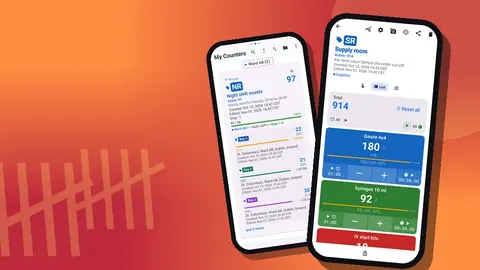
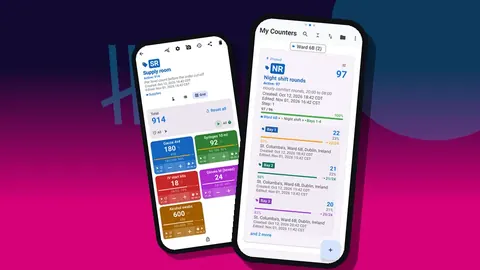
Each item became a tag with a color, a step and a target. Boxed items used a step of 1 per box. Targets were her guess at a sensible full-shelf quantity, which she expected to adjust. The targets showed as progress bars, so a half-empty shelf looked half-empty on the screen too.
She printed small QR labels for the shelf edges and stored each code on its tag. Staff could scan with the camera or type the short code underneath.
The First Few Weeks
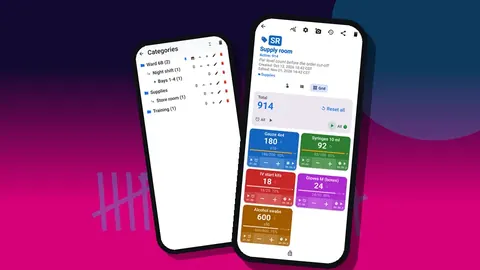
The routine Dana introduced had two parts. Whoever opened the clinic did a two-minute check in Grid view, where each item shows as a colored tile with its value and target percentage. Anything visibly low got topped up or flagged. Then, whenever someone took a box out of the cupboard, they tapped minus on that item.
The second part was the hard one. In the imagined first week, people forgot often. Dana did not chase it. She simply did her Monday count in the app instead of on paper, which reset the numbers to reality each week, and she pointed out when the app had warned of a shortage before it happened. That turned out to be more persuasive than reminders.
By the third week, most staff tapped when they took something. One nurse switched on volume-button counting so she could tap without unlocking the phone, which works in the background and on the lock screen via a foreground service once enabled in settings.
Where Did the Missing IV Kits Go?
In the story, week four brings a puzzle. IV start kits drop by eight in a single afternoon, far more than the clinic would normally use.
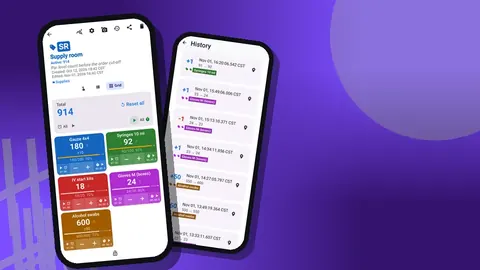
The history screen answers it quickly. Every count is logged with its exact time and before-and-after value. The entries show one large drop over a few minutes, followed by a note on the event: "Sent to sister clinic, they ran out." Nothing had been lost; it had been lent. Without the log, Dana would have ordered extra kits and quietly suspected waste.
Notes Instead of Sticky Notes
The clipboard's real value had always been the comments, not the numbers. Dana kept that by encouraging notes. A note can sit on a tag ("Supplier switched box size, now 50 per box"), on a counter ("S2 bottom shelf damp, moved stock up") or on a single history event.
The All Notes screen gathers them, with tag labels and times, and can be sorted. On Fridays Dana reads it first, before looking at any numbers.
What She Looks at on Fridays
Friday's review takes Dana about fifteen minutes in this example. She opens the dashboard for each shelving unit: total against target, increments versus decrements, the seven-day bar chart, and the pie chart by tag. A week where decrements dwarf increments means restocking from the delivery was missed. A tall bar on one day usually has a note behind it.
Then she checks the treatment room counter. If its numbers fall faster than the cupboard's, borrowing is back.
Sending the Report
The group's purchasing team wanted a spreadsheet, so Dana exports Summary and Notes as Excel. The export also offers CSV and an HTML report with embedded photos, and sections for Events and Locations. She keeps a copy of each week's file in a folder named by date.
What Might Not Work in a Real Clinic?
Honesty matters in a story like this, so here are the weak points a real clinic should expect:
- Tapping relies on habit. If staff do not tap when they take items, mid-week numbers drift. The weekly count corrects it, but daily accuracy depends on people.
- One phone, one source. There is no live sync between phones. If two people count on two devices, their numbers diverge unless one of them moves data with a backup ZIP.
- It is not a purchasing system. Prices, suppliers and order history belong elsewhere.
- No patient information. The app should hold supply counts, not anything about patients.
Three Months In (Still Imagined)
Suppose we check back on Dana's clinic a season later. The clipboard is gone; nobody asked for it after the second month. The exam rooms now have their own counters too, added one at a time once the cupboard routine felt automatic.
Several smaller changes would probably have happened along the way. Targets for gloves went up after a run of busy weeks and came back down when the season changed. Two tags were merged because staff could not tell the products apart on the shelf. A photo of the correct specimen cup, with its size circled in the photo editor, ended a recurring mix-up. The treatment room counter got a pinned category of its own because it was checked more often than anything else.
Dana also started making a backup ZIP every Friday after the export, stored on the clinic's shared drive. The phone had not failed, but she did not want a dropped handset to cost her three months of history. The backup includes photos, with compression switched on to keep the file small, and she tested an import once on a spare phone to see the preview and the replace, copy and skip choices before she ever needed them.
None of this is dramatic, which is the point. The value in a story like this comes from small, boring adjustments made because the numbers made them obvious.
What Dana Would Tell Another Manager
Start smaller than feels useful. A dozen items that cause real pain beat a hundred items nobody counts. Put the counting where the shelves are. Read the notes before the numbers. Expect the first targets to be wrong and change them without ceremony.
And keep the old clipboard for a month. Not because the app fails, but because it reassures the people who liked the clipboard.
Try a Version of This
If your clinic has its own "cupboard", try a single shelving unit for two weeks. The app is free to download with no ads; try it free for 3 days, then choose a yearly or monthly plan or a one-time lifetime purchase. Get the app at counterapp.online.
Frequently asked questions
Is Dana, the clinic manager in this story, a real person?
No. Dana and her clinic are an illustrative example built to show one possible workflow. The numbers in the story are made up.
Can several clinic staff members share one phone's supply counts?
They can use the same phone. There is no live sync between phones, so data moves between devices with a backup ZIP that is imported after a preview.
Does the counting app send clinic counts to a server?
Counter App has no account and no Counter App cloud, and the counts are stored on the phone. Files leave it when staff export or share them, and Android device backup, if enabled, may copy app data too.
Can clinic staff leave a note about why stock dropped?
Yes. Notes can be added to counters, tags and individual history events, and the All Notes screen shows them together.
What does the clinic's Friday supply report contain?
In this story, Summary and Notes exported as Excel for the purchasing team; CSV, an HTML report with photos, and the Events and Locations sections are also available.
Should every exam room be counted from the first week?
Not necessarily. Starting with the supply room and the room where borrowing begins keeps the work small, and other rooms can be added once the routine feels automatic.
Why keep the old supply clipboard for a month?
Keeping it briefly reassures staff who liked the clipboard while the new counting habit settles in.