Counter App

A Chef's Inventory Control on a Phone: A Scenario
Key takeaways
Kitchen inventory control on a phone starts with a paper map of the storage route, then mirrors it in the app. In this hypothetical chef's story, Counter App — Tally & Clicker holds a category per storage area, a counter per shelf and a tag per item at par, which removes retyping and gives a timestamped history.
- Marta, the head chef in this Counter App kitchen scenario, is hypothetical; the features described are real.
- A clipboard kitchen count loses accuracy at every step: an outdated list, a cold pen and a second round of typing.
- In Counter App — Tally & Clicker, naming each kitchen tag with its unit, such as "Butter (1 kg block)", prevents case-versus-bag confusion.
- A sous chef can run the same weekly kitchen count on another phone after importing a ZIP backup of the storage category.
This is a hypothetical scenario. The chef, the restaurant and every detail of their week are invented to illustrate a workflow. They are not a real customer story and no results are claimed. The Counter App features are real.
What was wrong with the clipboard count?
Imagine a head chef called Marta running a mid-sized neighbourhood restaurant with a seasonal menu, around forty seats and a kitchen team of five. Every Monday morning, before the first delivery, she counts the walk-in, the freezer and dry storage herself, using a printed sheet on a clipboard.
The sheet dates from two menus ago. Half the lines describe things she no longer buys; a dozen products she now uses are scrawled in the margin in three different pens. She counts in the cold with numb fingers, carries the clipboard to the office and types it into a spreadsheet. Some figures she cannot read back. Some items she skipped because they were behind a case she never moved. The order goes in anyway, partly from the sheet and partly from instinct.
None of that is unusual. It is how a lot of small kitchens operate. The problem is not effort; Marta works hard on that count. The problem is that the method loses accuracy at every step: an outdated list, a cold pen, a second round of typing.
What she actually needed
When she sits down to think it through, her list of requirements is short:
- The count should follow the shelves, and change easily when the menu does.
- No retyping between the walk-in and the office.
- A way to flag "this case looked wrong" without a separate notebook.
- Something the sous chef can run on her day off without a phone call.
- A record she can point to when someone insists the cream was there on Monday.
She does not want recipe costing, supplier integration or menu engineering. She wants a count she can trust, done the same way every week.
Evening one: the map on paper
Before touching the phone, Marta walks the storage with a pen and writes the route in the order her feet actually move. Walk-in: dairy shelf, proteins, produce racks, sauces and stocks. Freezer: top, middle, bottom. Dry store: shelves A to D, then the chemical shelf by the door.
She writes every item under its shelf, crosses out what she no longer stocks and adds what was only ever in the margin. It takes about an hour and it is the most important hour of the project, because everything after it simply copies this map.
Evening two: building it in the app
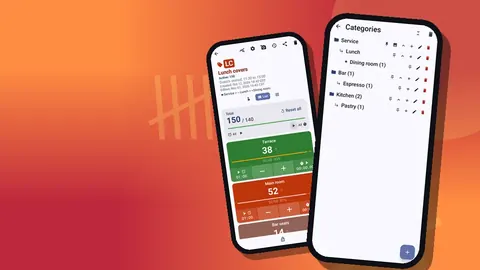
In Counter App she creates a top-level category "Kitchen storage" with sub-categories for Walk-in, Freezer and Dry. Categories nest up to three levels, carry custom colors and can be pinned, so she gives the walk-in blue, the freezer grey and dry storage amber, and pins the whole tree to the top of the counter list.
Inside each sub-category she creates a counter per shelf or rack: "Walk-in: dairy", "Walk-in: proteins", "Dry: shelf B". When she creates each counter, a category picker lets her drop it straight into the right branch of the tree, so nothing ends up floating at the top level.
Pars, steps and units on each item
Inside every counter she adds a tag per item, in the same order as the shelf. Each name carries its counting unit: "Butter (1 kg block)", "Chicken thighs (5 kg case)", "Shallots (bag)", "Eggs (tray of 30)". She sets each tag's target to its par level, so anything below target is an obvious ordering candidate.
Steps take a little thought. Most items count by 1. For eggs she counts trays, so one tap is one tray. For a protein that arrives in boxes of four portions and is stored in those boxes, she sets a step of 4 so a single tap adds a box. Any step from 1 to 100 works per tag.
For a handful of products that look almost identical in the dry store, such as two brands of tinned tomatoes, she scans the barcode onto the tag. The code is there to check against when a new cook is unsure, and it is there when the supplier asks for a product reference.
Monday: the first count
On Monday she resets each counter so she is counting from zero, opens the first one in List view and walks the route. Every item on the shelf is a row on the screen with minus and plus buttons, its value and its progress toward par. Tap, tap, tap.
Halfway through the proteins she finds a crushed case of tomatoes that belongs in produce. She takes a photo on that tag, adds a one-line note to the event, and carries on. When she meets a product that is not on the list at all, a new hot sauce someone ordered, she adds a tag in the correct counter on the spot rather than writing it down for later.
When each shelf is finished she locks the counter, so nothing changes while her phone sits on a shelf in the cold.
Gloves, cold hands and the volume keys
Halfway through the freezer her hands are full of a case of fish and her gloves are wet. She turns on volume-button counting in settings. It is off by default; once enabled, the side keys count up and down in the background and from the lock screen, and she maps one key to plus and the other to minus with a different vibration for each so she can feel which she pressed. Her phone may still flash the system volume bar, which she learns to ignore.
The first count takes roughly as long as the clipboard used to. That is expected: she spends the extra time fixing tag order and adding the forgotten items. The second week is the one that shows whether the structure works.
The notes that replaced the margin
Back in the office, Marta opens the All Notes screen. Every note from the count sits in one list, with its tag label and time, and she can sort it. "Tomatoes: case crushed, delivery Friday." "Cream: one tub short against invoice." "Shelf C: flour moved to the bottom by someone." Five lines, and that is her conversation list for the week.
The margin used to hold this information too. The difference is that the margin was illegible and nobody else could read it.
How did the history settle the Monday argument?
Two weeks in, a cook swears the double cream ran out because it was never ordered. Marta opens the history. Every tap is logged with an exact timestamp, the step, the value before and after, and the tag it belonged to, with icons for events that carry a note. Cream was counted at 08:12 on Monday at two tubs against a par of six, and it was on the order. The delivery was short. The argument ends in a minute and moves on to the supplier, where it belongs.
History has no search, so she is glad she named tags plainly. Scrolling a well-named log is quick; scrolling one full of abbreviations is not.
Handing it to the sous chef
On her day off, the sous chef in this scenario runs the Monday count on his own phone. There is no live sync between phones, so the handover happens with a backup. Marta makes a ZIP backup of the "Kitchen storage" category, with photos, and sends it to him. When he imports it, a preview shows what is in the file and lets him choose how to handle duplicates: replace, copy or skip. Every counter, tag, step and target arrives intact.
He counts, locks each counter and exports the result. On Tuesday Marta reads it next to the previous week's export. The notes column says "Cream short on delivery again". That is the whole handover: no phone call, no guessing which shelves he skipped.
Sending the count to the office
Each Monday, Marta exports from the share screen. She chooses CSV or Excel for the costing spreadsheet, and picks which sections to include: Summary for the closing figures, Notes when something needs explaining, Events when she wants to show the timing. An HTML report, which embeds photos, goes to the owner when there is damage to show.
Food cost is still calculated in her spreadsheet. Counter App gives her a closing count; it does not know ingredient costs or sales. Opening stock plus purchases, minus closing stock, divided by food sales: that formula has not changed, only the reliability of one of its inputs.
What changed in the scenario, and what did not
What changed. The list matches the shelves, so items stop getting skipped. Notes and photos travel with the item instead of living in her head. The sous chef can run the count because the structure is already on his phone. The history settles questions about what was there on Monday. And there is no retyping.
What did not change. Ordering is still her judgement. Food cost still lives in the spreadsheet. A messy shelf still takes longer to count than a tidy one. And the method still depends on someone actually doing the walk each week.
That is the honest picture. A phone does not fix a kitchen. A fixed method on a tool that does not get wet or lost makes the method easier to keep.
What she would tell another chef
- Draw the map on paper first. The app only copies the route you give it.
- Name the unit in the tag. It ends "is that a case or a bag".
- Keep notes to one line. Long notes stop being written.
- Lock as you go. Finished shelves should not change by accident.
- Back up the structure. A ZIP backup rebuilds the setup on a new phone and shares it with the sous chef.
- Do one thing at a time. Inventory first; prep counts and waste later.
The detailed, non-story version of this setup is in the restaurant inventory count guide. Once the weekly count is steady, the next steps are a daily mise en place count and a food waste log.
Counter App works offline, which matters in a walk-in with no signal, and it is free to download with no ads; try it free for 3 days, then choose a yearly or monthly plan or a one-time lifetime purchase. Get the app at counterapp.online.
Frequently asked questions
Is Marta, the chef in this inventory story, a real customer?
No. Marta and her restaurant are invented to illustrate a workflow, and no results are claimed. The Counter App features are real.
Does a kitchen inventory on a phone need a tablet or scanner?
No. Counter App runs on phones with Android 12 or newer and reads barcodes and QR codes through the phone camera, or accepts typed codes.
What happens if a cook deletes a kitchen counter by mistake?
The counter lands in the trash and can be brought back from there.
How does a sous chef get the kitchen count setup on his own phone?
Make a ZIP backup of the storage category with photos and import it on his phone. The import preview handles duplicates by replacing, copying or skipping them.
Does Counter App calculate food cost for a kitchen?
No. It produces a reliable closing count; food cost is worked out in a spreadsheet from opening stock, purchases, closing stock and food sales.
How did the history settle the missing-cream argument in the chef story?
The log showed cream counted at two tubs against a par of six on Monday morning, so the shortage came from a short delivery, not a missed order.