Counter App

Café Supplies Barcode Counter: A Morning Count Routine
Key takeaways
A cafe supplies barcode counter keeps lookalike items apart: each oat milk carton, bean bag or cup sleeve is a tag with its code and a par target. In Counter App — Tally & Clicker, a five-minute morning count grouped by location shows what is below par, and the export becomes the supplier order.
- Cafés most often run out of cheap, service-stopping items such as lids, oat milk, cup sleeves and key syrups.
- A café supply count is fastest when grouped by location: behind the bar, the under-counter fridge, the stockroom shelf and the cleaning shelf.
- Barcodes on Counter App — Tally & Clicker tags mainly keep similar cartons and bags apart and supply product references for orders.
- Café items with no barcode, such as house syrups, can share a printed QR shelf label whose code is stored on the matching tag.
In a café, the supply count fights for time with the espresso machine warming up, the pastry delivery and the first regulars knocking on the glass. If counting takes too long it gets skipped, and the order goes in from memory. Memory is generous with things you like and forgetful about lids. The fix is a short, fixed routine one person can finish before opening, with barcodes doing a quieter job than you might expect: keeping similar items apart.
What does a café really run out of?
A café supply list is short but fiddly. Many items look alike: three bags of beans from one roaster, four plant milks in near-identical cartons, a row of syrup bottles with the same pump. The items that hurt when they run out are rarely expensive. They are 12 oz lids, oat milk, cup sleeves and the one syrup your best-selling seasonal drink needs.
That shapes the count. You are not valuing stock to the cent each morning; you are making sure nothing that stops service is about to hit zero before the next delivery. A full valuation count can still happen weekly or monthly. The morning count is about continuity.
Group supplies by where they live
Organise the list by location rather than by product type. Nobody wants to walk to the stockroom for beans, back to the bar for milk and down again for cups.
- Behind the bar: open milk, syrups in use, cups and lids within reach, sugar and stirrers
- Under-counter fridge: backup milk, cream, plant milks
- Stockroom shelf: sealed beans, sleeves, napkins, to-go bags and carriers
- Cleaning shelf: machine cleaner, descaler, sanitiser, cloths
In Counter App, create a category such as "Café supplies" and a counter for each location. Categories can nest up to three levels, so a café with two sites can use "Supplies → Riverside → Stockroom". Give each location its own color and pin the category so it opens first. Inside each counter, add one tag per item, named with its counting unit: "Oat milk (carton)", "12 oz cups (sleeve)", "House espresso (1 kg bag)". Putting the unit in the name ends arguments about whether you counted cartons or cases.
Put a code on every tag
Each tag can carry a barcode or QR code. Scan the product's code with the camera when you create the tag, or type it if the label is damaged. The day-to-day benefit is certainty: a new barista can check a carton against the tag before tapping, and the code is right there when a supplier asks for a product reference.
Some supplies have no barcode at all, such as house-made syrups, cold brew concentrate or a local baker's granola. For those, print a small QR label for the shelf edge, store the same code on the tag, and label the spot rather than each bottle. A readable text code such as SYRUP-VANILLA-HOUSE still makes sense if the sticker gets splashed.
Do not chase codes for their own sake. If an item is unmistakable, its name and color are enough. Codes are for the shelf where mistakes actually happen.
Steps and par targets
Steps decide how much one tap adds, from 1 to 100 per tag. Cups and lids arrive in sleeves; either count sleeves with a step of 1, or set the step to the sleeve size if you prefer to count units. Milk counts per carton. Beans count per bag. Pick one rule per item and leave it alone.
Targets turn the count into an order. Set each tag's target to the level you never want to fall below before the next delivery. You can count up toward it, or count down from it if you prefer to start at par and subtract what has gone. A sound or vibration alert can fire when a target is reached, and auto-lock can stop a finished tag being tapped again by accident. For a morning count, counting up is the most intuitive: whatever ends below target goes on the order.
Revisit targets with the seasons. Iced drinks change cup sizes, and a cold snap changes milk usage.
The five-minute morning count
- Open "Café supplies" and the first location counter.
- Reset the counter so you count today's stock, not yesterday's plus today's.
- Walk the same route every morning: bar, fridge, stockroom, cleaning shelf.
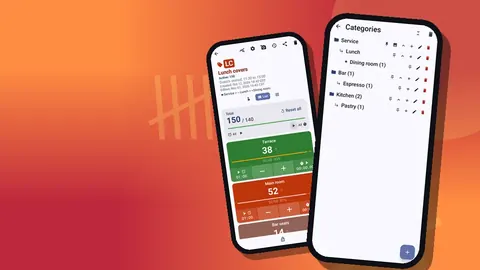
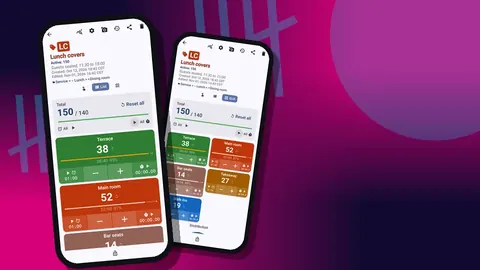
- Tap each item up to what you see. List view shows each item as a row with its value and progress toward target; grid view shows colored tiles if your list is short.
- Add a note to anything odd: a split carton, a short delivery, a syrup nearly out of date.
- Lock the counter.
If your hands are full of milk cartons, volume-button counting helps. It is off by default; once enabled in settings, the volume keys count up and down, even with the screen locked, and you can remap the keys with their own sound and vibration.
Single view for the item in your hand
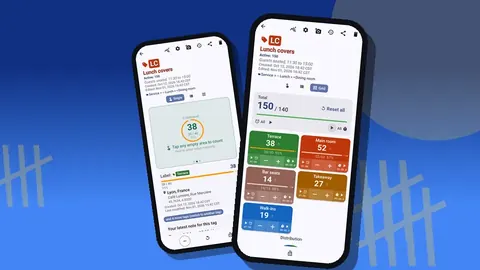
On busy mornings it can be easier to switch to Single view, where one tag fills the screen as a large circular counter with its target progress, its tag card and a bottom bar for minus, reset and lock. Count the item you are holding, swipe to the next, then flip back to the list. Big tap targets matter when your other hand is holding a crate.
How do you check a café delivery against the order?
The morning count tells you what to order; the delivery check tells you whether you got it. Create a second counter called "Today's delivery" with the same tags. As boxes arrive, count them up against the delivery note. If something is short or damaged, add a note and take a photo on that tag; each tag holds up to 6 photos and the photo editor lets you add text or mark the crushed corner. The All Photos screen gathers those pictures with their tag labels and dates, which is exactly what you want in front of you when you call the supplier.
Reset the delivery counter once everything is put away, so tomorrow starts clean.
How does the count become a supplier order?
From the share screen, export the morning count as CSV or Excel, choosing which sections to include: Summary, Events, Notes and Locations. Summary is usually enough for ordering. Compare each item with its target and fill in the order, reading product codes straight from the tags rather than hunting for cartons.
If the owner is not on site, send an HTML report instead. It opens in any browser and embeds the photos you took, so the owner sees the damaged delivery as well as the numbers.
Watching usage over a month
After a few weeks, the history and dashboard start telling you how quickly things go. History logs every count with its time; the dashboard shows totals against targets, increments against decrements, a seven-day activity chart and a pie chart by tag. If oat milk reaches its target every single morning, the target is too low or the order too small. If napkins never move, you are carrying more than you need.
Adjust targets from what you see, one or two at a time, and leave them for a fortnight before judging.
A sample morning, step by step
An illustrative example, not a real café. The opener arrives at 6:30. The machine goes on first, because it needs time to heat. While it warms, she opens "Café supplies", resets the bar counter and counts milk, syrups, cups and lids in the order they sit from left to right. Oat milk reads two cartons against a target of six, so it is flagged. The under-counter fridge takes a minute. The stockroom takes three: beans, sleeves, napkins, bags. One syrup bottle is sticky and nearly empty, so it gets a one-line note. She locks the counter, exports the summary to the owner and starts dialling in the grinder. The whole count fits inside the machine's warm-up.
That last detail is the point. A routine that hides inside time you already spend waiting is a routine that survives.
Habits that keep the routine alive
- Same order, every day. The tag order should mirror the walk so nobody doubles back.
- Whoever opens, counts. Write the rota in the counter notes if you rotate.
- Count before the delivery is put away. Otherwise items are counted twice.
- Keep the list current. Add a tag for a seasonal syrup when it arrives; delete it when it leaves. Counters that get deleted in a busy kitchen land in the trash, where they can be restored.
- Share the setup, not the phone. To give a second barista the same list on their own phone, make a ZIP backup and import it there. The preview lets you replace, copy or skip duplicates. There is no live sync, so agree who counts which day.
If your café also runs a kitchen, the restaurant inventory count guide covers multiple storage areas, and food waste tracking shows what happens to the pastries and milk you do not sell.
A café supply count survives when it is short, fixed and done before the doors open. Group by location, code the lookalikes, set targets at par and export straight into the order. Counter App is free to download with no ads; try it free for 3 days, then choose a yearly or monthly plan or a one-time lifetime purchase, even in a busy kitchen. Get the app at counterapp.online.
Frequently asked questions
What does a barcode add to a café supply count?
It ties each supply item to one code, scanned with the camera or typed, so a new barista can check a carton against the tag before tapping.
Can a café set a par level for each supply item?
Yes. Set the item's tag target to its par; anything still below target after the morning count goes on the order.
How do two baristas get the same supply list on their own phones?
Build the setup once, make a ZIP backup and import it on the second phone, choosing replace, copy or skip for duplicates. Agree who counts on which day.
Does a café supply count work in a basement stockroom without signal?
Yes. Counter App counts, saves notes and takes photos without any connection.
How do I record a damaged coffee supply delivery?
Add a note and up to six photos to the affected tag, using the editor to mark the crushed corner. The All Photos screen gathers them for the supplier call.
How long should a café morning supply count take?
Short enough to fit while the espresso machine warms up. A fixed route and a short tag list usually keep it to a few minutes.