Counter App

Building a Reading Habit With a Counter App
Key takeaways
To build a reading habit with a counter app, count pages instead of books. In Counter App — Tally & Clicker, a Reading habit counter with Pages read at step 5 and a 20-page daily target, plus tags for reading and audiobook minutes, makes every evening visible. A 10-minute timer starts sessions, and notes become a reading journal.
- The reader Mara in this reading habit story is an illustrative composite, and her numbers are examples rather than measured data.
- Measuring a reading habit in pages instead of books makes progress visible every evening.
- A step of 5 on a Pages read tag in Counter App — Tally & Clicker lets one tap at each natural pause add five pages.
- A 10-minute timer on a reading tag removes the decision of whether to start reading, since most sessions continue after the beep.
This is an illustrative story, not a case study. "Mara" is a composite of a very common reader: someone who loves books, buys them faithfully, and finishes perhaps one every few months. Nothing below is measured data; the numbers are examples chosen to show how the setup behaves. What is real is the method, and you can copy it exactly.
Why do yearly reading goals stall?
Mara's problem was never motivation. Every January she set a goal of a certain number of books, and every March she quietly dropped it. The goal was measured in books, but a book is a huge unit. Two weeks into a long novel, the counter still reads zero, and zero feels like failure even when you are reading every night.
The second problem was invisibility. Reading happened in scattered moments: ten minutes on a bus, half an hour before sleep, an audiobook while cooking. None of it left a trace, so none of it felt like progress. A habit you cannot see is easy to abandon.
The fix was not more willpower. It was a smaller unit and a visible record.
Changing the unit from books to pages
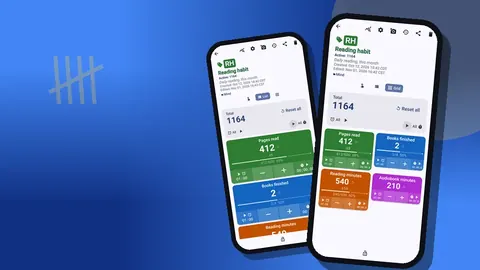
Mara created one counter called "Reading habit" and gave it four tags:
- Pages read, the core habit.
- Books finished, kept for celebration rather than pressure.
- Reading minutes, for evenings when page counts mean little, such as dense non-fiction.
- Audiobook min, so listening counts too.
Splitting it this way matters. A heavy philosophy book might yield six pages in thirty minutes, while a thriller gives forty. If only pages counted, hard books would feel like slacking. With minutes alongside, both kinds of evening register as real work.
In List view, all four tags sit on one screen with their values and progress toward their targets. Grid view turns them into colored tiles, which Mara preferred on the bedside table because the colors are easier to read in dim light.
What step size works for counting pages?
Tapping once per page is tedious and makes the phone the center of the reading session, which defeats the purpose. Mara set the step on Pages read to 5. One tap at each natural pause adds five pages. The step can be anything from 1 to 100, set per tag, so Reading minutes uses a step of 10 and Books finished stays at 1.
She set a daily target of 20 pages, counting up. A target gives each evening a finish line. When it is reached, the app can play a sound or vibrate, which turns "done for today" into a small, satisfying moment. She left auto-reset and auto-lock off for this counter, because she sometimes kept reading past the target and wanted those pages to count.
A gentle rule came with the target: twenty pages is the minimum to call a day a success, not a ceiling. Some readers set a lower floor, like five pages, specifically so that busy days still qualify. A floor you always clear beats a goal you mostly miss.
A timer as the starting gun
The hardest part of an evening reading habit is starting. The phone is in your hand, a feed is one swipe away, and "just five minutes of scrolling" becomes forty.
Inside Counter App, every reading tag comes with a separate timer and stopwatch. Mara used the Reading minutes timer as a ritual: pick the 10m preset, put the phone face down, read until it beeps. Presets run from 30s to 10m, and a longer duration can be typed manually. Countdown beeps and a choice of alarm sounds and vibrations make the end clear without needing to watch the clock.
Ten minutes is short on purpose. Nearly everyone keeps reading after the alarm, and the stopwatch can run instead when the session is open-ended. The timer is not there to limit reading; it removes the decision of whether to start.
Notes that turn counts into memory
Counts show that you read. Notes show what you read. Mara got into the habit of adding a one-line note to the occasional count event: a character's name, a sentence that struck her, "chapter 12 drags". Notes can also live on the tag itself, which suits a running list such as "currently reading".
The All Notes screen collects every note with its tag label and time, sortable, in one list. Over a few months that list quietly became the reading journal she had never managed to keep in a notebook. It costs a few seconds per entry and needs no separate app.
A practical tip: note the title when you start and finish a book, attached to the Books finished tap. Later, the history and notes together give you a complete list of what you read and when.
Photos of the pages worth keeping
Sometimes a passage deserves more than a note. Each tag can hold up to six photos, so Mara photographed a page with an underlined paragraph, or a cover when she finished a book she loved. The built-in photo editor adds brush strokes, text in six colors and four fonts, bold or italic styling and rotation, which is enough to circle a sentence or write the date on the image.
Six photos per tag is a natural limit that encourages curation. Instead of documenting everything, you keep the handful of pages that mattered most and replace them over time. The all-photos gallery shows them together with their tags and dates.
What can a reading log reveal about your habits?
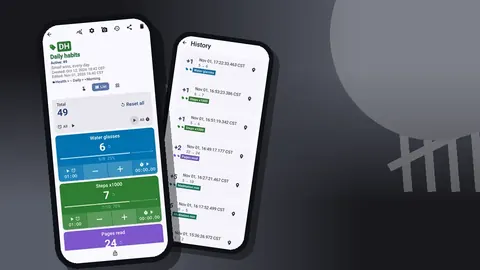
After the first fortnight, Mara opened the history screen for the first time. Every tap was there with its exact time, the step, the value before and after and the tag. What she saw surprised her, and this is the part most readers would recognize.
Almost no reading happened on the evenings she had planned for it. The real reading clustered in two places: weekday commutes and late Sunday mornings. The bedtime sessions she pictured as the heart of the habit were short and frequently missing.
That changed the plan. Instead of fighting tired evenings, she moved the daily target's weight to the commute, kept a book in her bag permanently and treated bedtime pages as a bonus. A record with timestamps does this better than memory, because memory reports what you intended rather than what happened.
The monthly picture
At month's end, the dashboard summarized the counter: total against target, increments versus decrements, a seven-day activity chart and a pie chart by tag. The pie was the interesting part. In an illustrative month, audiobook minutes might take a far bigger slice than expected, which tells you listening is not a lesser form of the habit but a central one.
For a longer record, she exported. The export dialog lets you choose Summary, Events, Notes and Locations and save as CSV or Excel, or produce an HTML report with embedded photos. A monthly HTML report with the page photos and notes makes a pleasant thing to reread at the end of the year.
The setup to copy
- Create a counter named "Reading habit" in a Mind category.
- Add tags: Pages read (step 5, target 20), Reading minutes (step 10), Audiobook min (step 10), Books finished (step 1).
- Pick Grid or List view, whichever you read faster.
- Use the 10m timer to start each session.
- Tap at natural pauses, not every page.
- Add a note when a book starts or ends, and whenever a line is worth keeping.
- Review history every Sunday; adjust when and where you read, not just how much.
- Export at the end of each month.
If you have tried before and stopped
Lapses are part of the data. When a week goes empty, do not reset the counter to erase the evidence. Leave it, add a note such as "flu week", and start again. A history that shows recovery after a gap is more encouraging than one that pretends the gap never happened.
Make the first day back absurdly easy: one tap, five pages. Then the next day the same. The habit returns through repetition, not through a dramatic restart, and the counter is simply the place where those small repetitions become visible.
Small frictions worth removing
A few practical details decide whether a reading habit survives an ordinary week. Keep the current book where your hands already go: in the bag you carry daily, beside the kettle, on top of the remote control. Decide in advance what counts, so there is no evening debate about whether a magazine article or a cookbook qualifies; Mara counted any sustained reading of more than a few pages, and wrote that rule in the counter description.
Put the counter where you will see it. Pinning the Mind category keeps "Reading habit" at the top of the list, so the first screen you open in the app reminds you of it. Choose a quiet count sound, or none, if you read next to someone who is asleep.
Finally, allow abandoning books. A book you dread opening stalls the whole habit. Log a final note such as "stopped at chapter 6, not for me", tap nothing on Books finished, and start something you actually want to read tonight.
Mara's setup runs on Counter App — Tally & Clicker by GiveMeMood, an Android 12+ app that is free to download with no ads; try it free for 3 days, then choose a yearly or monthly plan or a one-time lifetime purchase. Get the app at counterapp.online.
Frequently asked questions
Can a reading tracker count pages in jumps of 5 or 10?
Yes. The step can be any value from 1 to 100, set per counter and per tag, so one tap can add 5 or 10 pages.
Can a reading session be timed in Counter App?
Yes. A reading tag has its own timer and stopwatch; the timer offers presets from 30 seconds to 10 minutes or a typed duration.
Can a reading counter double as a reading journal?
Yes. You can add notes to a tag and to individual count events. The All Notes screen gathers them in one list with sorting.
Can a photo of a favourite page or book cover be saved with the reading count?
Yes, up to 6 photos per tag. The built-in editor adds brush strokes, text in 6 colors and 4 fonts, and rotation.
Does a reading habit tracker need an account to keep the log?
No. Counter App — Tally & Clicker needs no account and has no Counter App cloud; the reading log is stored on the phone and moves to a new device with a backup ZIP.
Should audiobook listening count toward a reading habit?
It can. A separate Audiobook min tag lets listening register as real progress without mixing it into the page count.
Should a reading counter be reset after a missed week?
No. Leave the gap in the record, add a note such as 'flu week' and start again; a history that shows recovery is more encouraging than an erased one.