Counter App

90 Days of Self-Improvement, One Tap at a Time
Key takeaways
This hypothetical 90-day story shows how a self-improvement tracker on Android works in practice. With Counter App — Tally & Clicker, Dana starts with one counter and three small habits, reviews the timestamped history at day 30, adds habits only after two steady weeks, survives a phone change with a backup ZIP and exports the quarter.
- Dana in this self-improvement tracker story is hypothetical, and the numbers are examples rather than study measurements.
- The self-improvement plan in the story starts with only three small daily habits and adds one more only after two steady weeks.
- A first review of the Counter App — Tally & Clicker history at day 30 corrected beliefs about when habits really happened.
- Counter App has no live sync between phones, so a regular backup ZIP is the way to move a habit history to a new phone.
What follows is a hypothetical story. "Dana" is not a real person, and none of the numbers are measurements from a study; they are examples picked to show how a simple tracker behaves over three months. The structure is the useful part: what to set up first, when to review, when to add more and what to leave alone.
Day 0: which habits should you start with?
Dana's starting point is ordinary. Work is busy, evenings disappear into a screen, exercise happens in bursts and then stops, and a pile of unread books sits by the bed. The temptation is to fix all of it at once with a dramatic plan.
Instead, Dana spends twenty minutes with a sheet of paper and writes down everything worth changing. The list runs to eleven items. Then comes the hard part: picking three. The rule is to choose habits that are small, daily and obvious to count. Dana picks:
- a 20-minute walk,
- ten pages of reading,
- a glass of water before each meal.
Everything else on the list goes into a "later" note. That note matters, because it gives the other ten items a home instead of a nagging presence.
Days 1–14: a deliberately small setup
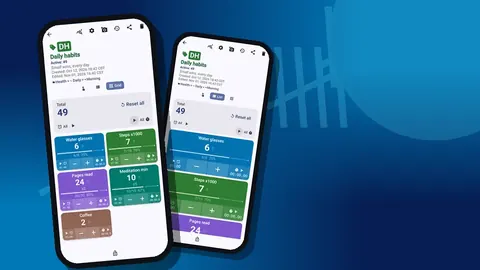
Dana creates one counter, "Daily habits", with a calm color and a short code. The description says, simply, "Feel less tired by spring." Three tags go inside: Walk, Pages read and Water glasses. The steps are 1, 5 and 1, so one tap is one walk, five pages or one glass. Targets are modest: one walk, ten pages, three glasses.
For two weeks nothing else is added. No categories, no extra counters, no photos. The only job is to tap right after the habit happens.
The first days are clumsy. Dana forgets to tap after lunch and logs the glass in the evening, adding a note: "late log". A few accidental taps get undone with the minus button. None of that is failure; it is the system being learned.
Days 15–45: watching numbers build
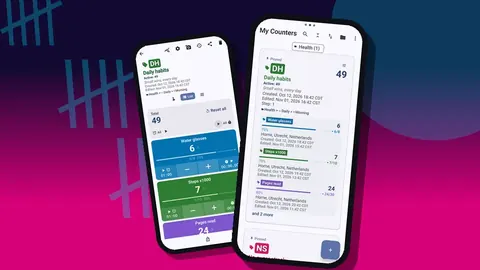
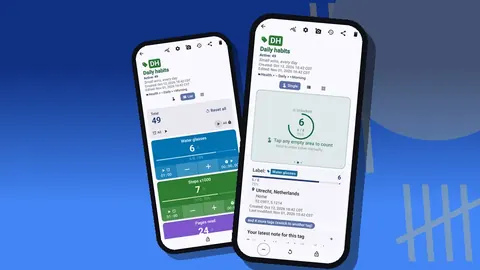
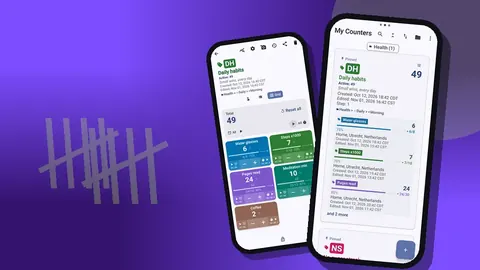
By the third week, tapping is automatic. Grid view becomes the default because the three colored tiles show values and target percentages at a glance, and each tile has its own minus and plus buttons. The walk tile gets its stopwatch started at the front door and stopped on return, which turns "I went for a walk" into a real duration.
Dana also turns on volume-button counting for the water habit. It is off by default; once on, it works in the background and on the lock screen. Logging a glass at the kitchen table no longer requires opening anything.
Around day 30, Dana notices something subtle. The numbers are not dramatic, but they are steady, and steadiness feels different from the old burst-and-stop pattern. That feeling is the real reward of the first month.
What did the first 30-day review show?
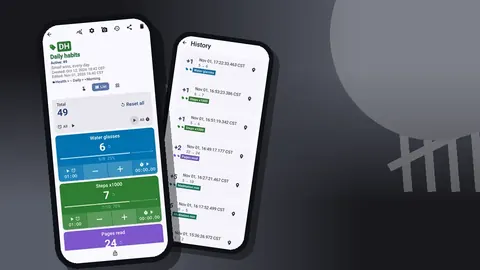
On day 30, Dana sits down with the history screen for the first time. Every count is listed with its exact time, the step, the value before and after and the tag. Notes and photos show as small icons.
Memory says walks happen most days. The history says walks happen on weekdays at lunchtime, and almost never at weekends. Memory says reading happens at bedtime. The history says reading happens on the train and the bedtime sessions are short and patchy.
These are the kinds of findings a log produces, and they are more useful than any motivational advice. Dana moves the weekend walk to a fixed Saturday morning slot and stops pretending bedtime is reading time.
Days 46–75: adding, carefully
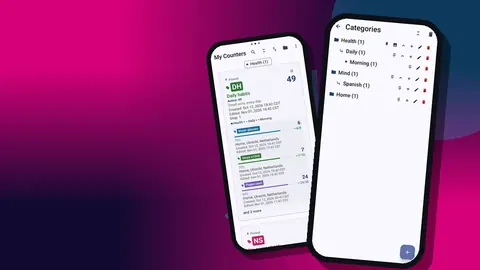
With three habits stable for six weeks, Dana adds one more: a short strength routine, three times a week. It goes into a second counter, "Strength", because it has a different rhythm from the daily habits. Now there are two counters, so Dana creates two categories, Health and Mind, and files them. Categories can nest up to three levels, but one level is plenty here.
Dana also starts using photos. Once a month, a photo goes onto the Strength tag: same spot, same light. The photo editor adds the date in text and a quick brush mark. Each tag can hold up to six photos, which is enough for half a year of monthly markers before the oldest needs replacing.
One rule holds: no new habit until the existing ones have been steady for at least two weeks. Twice during this period Dana wants to add meditation and twice decides to wait.
A new phone halfway through
Around day 60, Dana's phone breaks and a new one arrives. There is no live sync between phones, no account and no Counter App cloud. Fortunately, Dana had made a backup ZIP a week earlier, including photos, after reading that this was the only way to move data.
On the new phone, the import shows a preview of what the backup contains and asks how to handle duplicates: replace, copy or skip. On a fresh phone with nothing on it, there is nothing to clash with. Within a few minutes, the counters, history and photos are back.
The lesson Dana takes away is boring but important: put a monthly backup on the calendar. Backups can include only selected counters and categories, and photo compression keeps the file smaller.
Days 76–90: the full picture
In the final stretch, the dashboard becomes the main tool. For each counter it shows total and target, increments versus decrements, per-tag progress, a seven-day activity bar chart, a pie chart by tag, and the photos and notes.
The seven-day bars for "Daily habits" look even, week after week. The pie chart is more surprising: water, the habit Dana considered trivial, takes a large share, while reading has crept up steadily since the commute change. The strength counter's bars show the three-times-a-week rhythm clearly, with gaps exactly where Dana's notes mention a cold.
On day 90, Dana exports both counters. The export lets you choose Summary, Events, Notes and Locations, as CSV or Excel, and an HTML report can include photos. The HTML version, with the monthly strength photos embedded, is the closest thing to a before-and-after picture of the quarter.
Photos as a visual diary
The all-photos gallery shows every photo in a grid with tag labels and dates. For Dana, it turns out to be the most motivating screen of all, more than any chart. Numbers say what was done; photos show what it looked like. Scrolling through three months of dated pictures makes slow change visible in a way a spreadsheet cannot.
Dana also changed how the counters looked. Giving each goal its own color made the counter list readable at a glance, and switching to grid view put every habit on one screen. On busy mornings that mattered more than any chart: one look showed which counters had not moved yet.
What lessons came out of the 90 days?
- Small beats ambitious. Three habits for six weeks did more than eleven would have done for six days.
- Records beat memory. The history corrected Dana's beliefs about when habits happened, and those corrections drove the best changes.
- Steady beats intense. Even bars on the activity chart felt better than occasional heroic days.
- Adding should be earned. Waiting two weeks before each new habit kept the system from collapsing under its own weight.
The setup, if you want to borrow it
- One counter, three tags, small steps, modest targets.
- Tap immediately after each habit; note late logs.
- First review at day 30 using the history.
- Add one habit at a time, only after two steady weeks.
- Use categories once you have more than one counter.
- One progress photo per month on the tag that matters most.
- Monthly backup ZIP; export at the end of the quarter.
Your first week
Pick three habits tonight. Tomorrow, create the counter and the tags. Choose a theme and a count sound you like, because small pleasures help in week one. Then do nothing more complicated than tapping. In thirty days, open the history and see what it tells you.
What Dana chose not to track
Leaving things out was as important as the habits that made the cut. Dana deliberately skipped tracking mood scores, sleep hours and screen time during the first quarter. None of these is a bad thing to measure, but each added a daily decision and a rating that felt like homework. Mood showed up instead in occasional notes attached to counts, which was enough to see patterns without turning feelings into numbers.
The "later" note from day 0 was reopened at day 90. Two items had become irrelevant, one had happened on its own, and meditation was finally given a tag for the next quarter.
There is a general point here for anyone borrowing this approach. Every metric you add has a cost in attention, and that cost is paid daily, while the benefit only appears at review time. Before adding a tag, ask what decision its numbers would change. If you cannot name one, the tag is probably curiosity rather than a habit, and curiosity can wait until the core habits are stable and boring.
Dana's story is fiction, but the tools are real: Counter App — Tally & Clicker by GiveMeMood, for Android 12+; it is free to download with no ads; try it free for 3 days, then choose a yearly or monthly plan or a one-time lifetime purchase. Get the app at counterapp.online.
Frequently asked questions
Can a self-improvement tracker show progress over three months?
History keeps every count with its time, and the dashboard shows totals, per-tag progress and a 7-day activity chart. For months-long comparisons, export to CSV or Excel.
How is a habit history moved when changing phones mid-way?
Make a backup ZIP with photos on the old phone and import it on the new one, where a preview lets you replace, copy or skip duplicates.
Does a self-improvement tracker need a connection to log habits?
No. Habits are counted offline; the internet is touched only for optional notifications, update checks and map tiles.
Can monthly progress photos be kept with a habit?
Yes, up to 6 photos per tag, with an editor for brush, text, colors, fonts and rotation, and an all-photos gallery.
Can the look of a habit tracker be personalised?
Yes. There are 6 theme skins, light, dark or system mode, 3 size presets, font scale from 0.7 to 1.5, 10 fonts and 5 date formats.
How many habits should a self-improvement plan start with?
Three small, daily, easy-to-count habits is a sensible start. In the story, three habits kept for six weeks did more than eleven attempted at once would have.