Counter App

Quit Bad Habits by Counting Them
Key takeaways
To quit a bad habit with a counting app, first count every occurrence for a week without a target. In Counter App — Tally & Clicker, add a tag per trigger, log discreetly with the volume keys, note specifics, then set a countdown target just below your baseline and lower it gradually while comparing weeks, not days.
- Quitting a bad habit with a counting app starts with a one-week baseline of counting without any target.
- Trigger tags such as Bored, Stressed or In bed let each tap in Counter App — Tally & Clicker record both the habit and its context.
- A countdown target slightly below the baseline daily average, with optional auto-lock, creates a pause before the next occurrence.
- Counter App is a counting tool, not a medical or addiction treatment tool; health concerns belong with a qualified professional.
Most attempts to quit a habit start with a promise and end with a guess. You promise to stop checking your phone in bed, and two weeks later you are not sure whether you have improved or simply stopped paying attention. Counting changes that. It replaces a vague feeling with a record, and a record is something you can actually work with.
This article is about everyday habits: late-night scrolling, snacking out of boredom, nail biting, too much coffee, impulse purchases. It is not a treatment plan. If a habit is harming your health or involves addiction, talk to a qualified professional; a counter can sit alongside that help, never replace it.
Why count a habit before trying to cut back?
The first rule is counterintuitive: do not try to cut back during the first week. Just count. Every time the habit happens, tap. No judgment, no target.
There are two reasons. First, most people underestimate how often a habit happens, and a baseline gives you the real starting point. Second, the act of tapping interrupts autopilot. Many people notice that counting alone makes them pause, because the tap forces a moment of awareness right when the habit fires.
If you skip the baseline, you have nothing honest to compare against later. A week feels long, but it is the foundation everything else rests on.
Setting up the counter
Create a counter named after the habit, such as "Late-night scrolling" or "Coffee". Give it a color you associate with caution and a short code so it stands out in the list. In the description, write the reason you want to change, in your own words. On a hard evening, that sentence is worth more than any statistic.
Keep the step at 1. One occurrence, one tap. Leave the target off for the baseline week.
If you are working on more than one habit, give each its own counter rather than lumping them together. Separate counters make separate trends, and you will want to see each one clearly.
Trigger tags
A habit rarely fires at random. It follows triggers: boredom, stress, a particular place, a particular person, a time of day. Instead of one tag, add a tag per likely trigger:
- Bored
- Stressed
- After a meal
- In bed
- Social
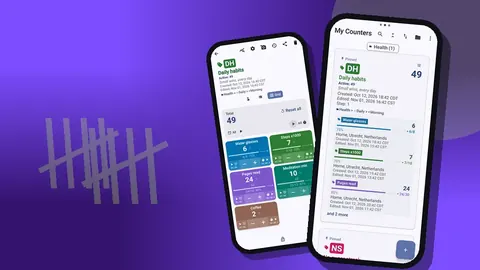
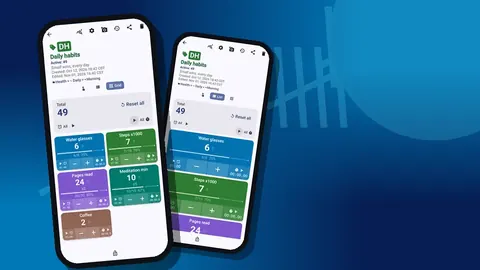
Now each tap answers two questions at once: it happened, and here is why. Grid view is ideal for this, with one colored tile per trigger, values and target percentages visible, and − and + buttons on each tile. List view works equally well if you prefer rows.
Do not try to predict every trigger on day one. Start with three or four, and add a tag when you notice a new pattern. An "Other" tag is fine as a temporary home until a pattern emerges.
If you tap the wrong trigger, press − on that tile and + on the right one. The history keeps both events, so corrections never hide information.
Logging the moment, discreetly
The habit often happens where you would rather not open an app: at a dinner table, in a meeting, in bed beside a partner. Volume-button counting helps. Enable it in settings, choose which key does what, and turn the per-key sound and vibration down or off. It is off by default. Once enabled, it works in the background and on the lock screen through a foreground service.
The lock-screen notification adds −step, +step and Stop buttons as another quick route. On some devices, pressing a key may still show the system volume bar briefly; the count is recorded anyway.
Discreet logging protects honesty. If logging is awkward, you will skip the embarrassing moments, which are exactly the ones you need to see.
Notes as a trigger journal
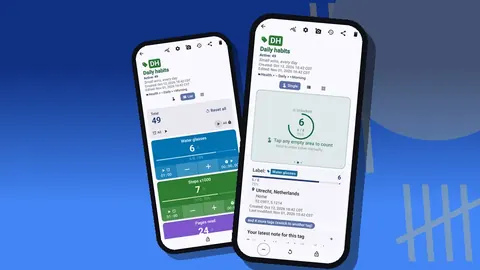
Tags capture the category of trigger. Notes capture the specifics. Attach a short note to an event when something stands out: "after the call with my manager", "couldn't sleep", "saw an ad". Keep it to a few words; long entries are a chore and stop happening.
The All Notes screen gathers every note with its tag and time, and you can sort the list. After a fortnight, read it in one sitting. Patterns that are invisible day to day become obvious on a single screen: the same person, the same hour, the same feeling.
Notes are also where you can record wins. "Wanted to, went for a walk instead" deserves a line. A journal that only records lapses is discouraging; one that records resistance shows you what works.
How do you set a reduction target for a habit?
After the baseline week, set a target. Use a countdown: start from a number a little below your baseline daily average and count down toward zero. If you averaged around ten occurrences a day, for example, a first countdown from eight is realistic.
The target settings let you choose what happens at the line. A sound or vibration warns you when you reach the allowance. Auto-lock goes further: the counter locks itself, so logging another occurrence takes a deliberate unlock. That extra step is not a barrier to honesty, since you can still unlock and log, but it creates a pause at the right moment.
Auto-reset can restart the countdown when the target is reached, which some people prefer for repeating allowances. Otherwise, reset the counter yourself at the start of each day; history keeps every past event either way.
Lower the target in small steps, perhaps by one each week, and only when you have met the current one most days. Big cuts produce rebounds.
Reading the history
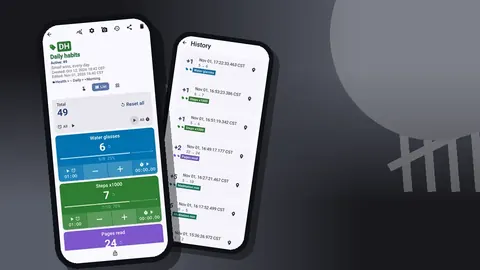
Once a week, open the history. Every event is listed with its exact time, the step, the value before and after, the tag and icons for notes, photos or locations. Read it with a few questions in mind:
- Which hours are the busiest? A cluster at 22:00–23:00 suggests changing the evening, not the willpower.
- Which trigger tag shows up most? That is where a replacement behavior should go first.
- Are there long stretches with nothing? Those are the conditions to recreate.
There is no search inside history, so the weekly read-through is a scroll. That is fine; reading a week's events in order is the point.
Watching the trend
The dashboard summarises the counter: total and target, increments versus decrements, a seven-day activity bar chart, per-tag progress and a pie chart by tag. For a habit you are reducing, the bar chart should drift downward over weeks, not necessarily every day. The pie shows which triggers dominate.
Expect noise. A stressful week will push the bars up. Compare weeks, not days, and keep the exports if you want a longer view. The export dialog lets you choose Summary, Events and Notes for CSV or Excel, and a spreadsheet makes month-over-month comparisons easy.
Why replace a habit instead of just removing it?
A habit usually meets a need, even a small one: a break, comfort, stimulation. Removing it leaves a gap, and gaps get filled by the old habit. Plan a replacement for your top trigger.
Track the replacement too. Add a second counter, or a tag in a separate counter, for the alternative: a short walk, a glass of water, a page of a book. Then you can watch one number fall while another rises. That pairing is far more motivating than staring at a decreasing count alone.
A realistic view of time
Changing a habit takes longer than most people expect, and progress is uneven. Some weeks will be worse than the baseline. That does not erase the progress; it is part of it. The value of the record is that it shows the overall direction, which your mood on a bad day will not.
The record is stored on your phone, with no account and no Counter App cloud. Lock the counter against accidental taps if the phone travels in a pocket.
Be kind to the data
Never delete events to make a week look better, and never stop logging because a day went badly. A gap in the record is worse than a high count, because it hides exactly what you need to understand. Log the lapse, add a note if it helps, and carry on tomorrow. Honest numbers, read calmly once a week, are the whole method.
Telling someone, or not
Some people find it helps to share progress with a friend or partner; others find that pressure backfires. Both are valid, and you can choose. If sharing helps, a monthly HTML report or a CSV export gives the other person something concrete, without a running commentary. If privacy matters more, keep the counter to yourself: there is no account, and the counts are stored on your phone.
Whichever you choose, decide before the first hard week rather than during it. Choices made in a calm moment tend to hold better than ones made after a lapse, when the urge is either to hide everything or to confess everything at once. Write your decision in the counter description so it stays settled.
Habit-breakers can use Counter App — Tally & Clicker by GiveMeMood on Android 12+ and is free to download with no ads; try it free for 3 days, then choose a yearly or monthly plan or a one-time lifetime purchase. Get the app at counterapp.online.
Frequently asked questions
Can a habit counter record what triggered each occurrence?
Yes. Create a tag for each trigger, so every tap records both the habit and its context, and add notes to individual events when you want more detail.
Can a habit reduction target count down to a daily allowance?
Yes. A countdown target starts from your allowance, and reaching it can trigger a sound, a vibration, an auto-reset or an auto-lock.
Can a bad habit be logged discreetly in company?
Yes. With volume-button counting enabled and its per-key sound and vibration switched off, a key press logs the habit from a pocket without opening the app.
Who can see a bad habit log in Counter App?
Counter App — Tally & Clicker has no account and no Counter App cloud; the log is stored on the phone, and a counter can be locked against accidental taps.
Is this a medical or addiction treatment tool?
No. It is a counting app. For addiction or health concerns, talk to a qualified professional.
How fast should a habit reduction target be lowered?
Lower it in small steps, perhaps by one each week, and only after meeting the current target on most days. Big cuts tend to produce rebounds.