Counter App

Hostel Linen Inventory: Count Sheets and Towels by Phone
Key takeaways
A hostel owner can track linen on an Android phone by giving each storage point a counter and each linen type a tag with a par-level target. Counter App — Tally & Clicker logs every movement to and from the laundry with a timestamp, so missing sheets and towels show up in a daily walk and a weekly exported audit.
- A hostel linen inventory in Counter App — Tally & Clicker uses one counter per storage point and one tag per linen type, such as sheets, towels and pillowcases.
- Par levels for hostel linen are set as tag targets, which can count up for restocking or down for a store room that hands linen out.
- An At laundry tag kept as a running balance shows when a laundry service returns fewer sheets or towels than it collected.
- A weekly linen audit combines a full count with each counter's dashboard and a CSV, Excel or HTML export for the hostel owner.
Linen is the quiet cost of running a hostel. Every bed turns over often, every guest expects a clean sheet and a towel, and every missing pillowcase becomes a small scramble at check-in time. Sheets vanish into backpacks, towels end up at the beach, stained items get binned without anyone writing it down, and the laundry service returns a bag that is lighter than the one it took. None of this is dramatic on its own. Over a season it adds up to replacement purchases nobody planned.
A counting routine will not stop every loss, but it will tell you where and when linen goes missing. This guide sets out a structure and a daily and weekly routine that a hostel owner or manager can run on an Android phone with Counter App.
Where does linen sit in a hostel during a day?
Before you count anything, sketch where linen actually sits during a normal day. In most hostels it is spread across:
- Main store room: the clean stock.
- Floor cupboards or trolleys: working stock near the dorms.
- In rooms: on beds and in lockers, in use by guests.
- Dirty bins: waiting for collection.
- At the laundry: out with the service or in your own machines.
Each of these is a place where items can be counted, and each transfer between them is a point where items can slip away. Draw the loop on paper once. It becomes the basis of the structure in the app.
Set up the structure
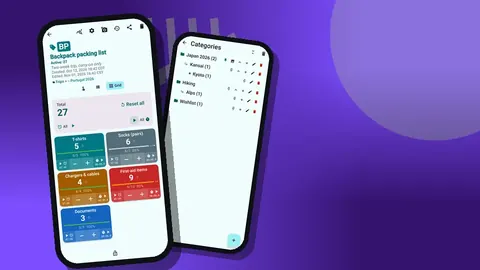
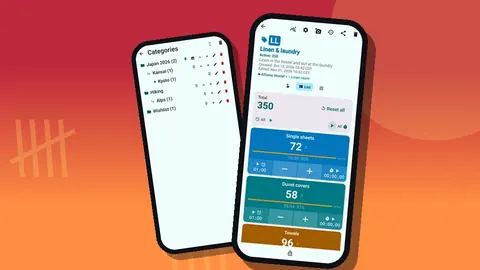
Create a category for the property. If you run more than one building, add a sub-category per building, and below that a third level per floor if needed. Categories nest three levels deep, can carry custom colors and can be pinned, so the main building appears first.
Inside, create one counter per storage point: "Main store", "Floor 1 cupboard", "Floor 2 trolley" and "Laundry". In each, add one tag per linen type:
- Single sheets
- Duvet covers
- Towels
- Pillowcases
- At laundry (in the laundry counter)
Use the same names and colors in every counter. Consistency is what makes the export useful later, because a spreadsheet can only add up rows that match. Give each tag a step that suits how items are handled. If towels arrive in bundles of ten from the laundry, a step of 10 on that tag saves taps; any value from 1 to 100 is allowed, per counter and per tag.
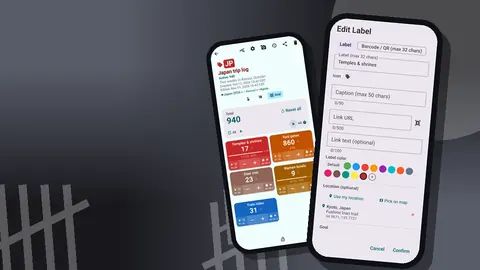
A tag can carry a barcode or QR code as well, handy for linen shelves. Some hostels stick a printed label on each cupboard door and store the matching code on the counter's tags, so a new staff member can confirm they are in the right place. Codes can be scanned with the camera or typed.
Par levels and alerts
Every tag can have a target, which works well as a par level: the number that should be on the shelf at the start of a shift. Targets can count up or down. Counting up suits restocking a cupboard to its par; counting down suits a store room where you subtract what leaves. Reaching the target can trigger a sound or a vibration if you turn that on. Auto-reset and auto-lock on reaching the target are optional, and auto-lock stops a cupboard total being changed by accident after a finished count.
The daily room walk
Pick a fixed time, usually after the checkout rush and before the laundry pickup. Walk the route in the same order every day: main store, each floor, dirty bins, laundry counter.
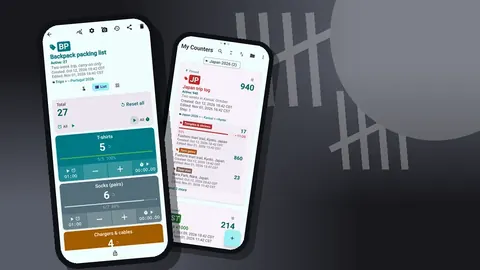
At each stop, open the counter and switch to Grid view. Every linen type shows as a colored tile with its value, target percentage and minus and plus buttons. Recount and adjust. If the store has three fewer towels than yesterday with no matching laundry movement, note it on the event right away: "3 towels missing, room 4 checked out early".
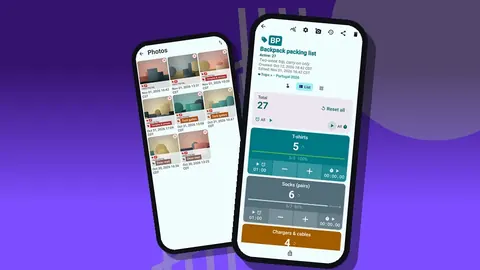
Notes attach to individual events and to tags, and you can add up to six photos per tag. A photo of a badly stained stack is a much clearer record for the owner than a line saying "some damage".
Counting with arms full
Linen is counted while carrying it. Volume-button counting is off by default; switch it on in settings. The volume keys then count even with the phone in a pocket and the screen locked, through a foreground service. You can remap the keys and give each its own sound and vibration. On some devices the system volume bar may still appear while you count. The lock-screen notification also has minus, plus and Stop buttons.
How do you track linen sent to the laundry?
The laundry hand-off is where hostels most often lose track. Use the "At laundry" tag in the laundry counter as a running balance.
- When dirty linen leaves, count it out of the dirty bin counter with minus, and into "At laundry" with plus.
- When clean linen returns, count it out of "At laundry" with minus, and into the main store with plus.
- If the returned count is lower than what left, the balance on "At laundry" will not return to zero. That is the signal.
Every event is logged in the history with its exact time, the step, the before and after values, and the tag. Look for the time the bag left and the time it returned, and you have a clear record to raise with the laundry service. If you use your own machines, the same loop shows whether items are sitting forgotten in a dryer.
Each tag also has a timer and stopwatch, with presets of 30 seconds to 10 minutes. A stopwatch on the laundry tag is a simple way to time a sorting session, or a short timer can remind you to move a load.
The weekly audit
Once a week, do a full count of everything: store room, cupboards, trolleys, beds in empty rooms, and the laundry balance. Then open the dashboard of each counter. It shows the total against target, increments versus decrements, an activity bar chart for seven days and a pie chart by tag.
Questions worth asking during the audit:
- Which linen type fell short of par most often this week?
- Is "At laundry" drifting upward, meaning items are not coming back?
- Are towels disappearing faster than sheets? Towels leaving with guests is a common pattern worth checking for your property.
- Did any cupboard show no activity, which might mean nobody is counting it?
An honest audit sometimes reveals that the counting itself is the problem. If one floor's numbers look too perfect, ask who is doing the walk.
Can several hostel staff share linen counts?
There is no live sync between phones. For most small hostels the simplest answer is one dedicated linen phone kept at reception. If staff need their own phones, move data with a backup ZIP. The import shows a preview with counts and offers replace, copy or skip for duplicates. Lock counters that should not be touched, and remember that deleted counters can be restored from the trash.
The data is stored on the phone, with no account and no Counter App cloud, which also means a regular backup to a computer is worth scheduling.
Reports for the owner
At the end of the week, export. The export options let you choose Summary, Events, Notes and Locations, and save as CSV or Excel. A spreadsheet makes it simple to compare weeks and to estimate replacement orders. The HTML report embeds photos, which is useful when the owner wants to see damage rather than read about it. You can share the HTML page or export the data from the Share Counter screen.
Over a season, a folder of weekly exports becomes the evidence base for decisions: buying more towels before summer, changing the laundry service, or adding a towel deposit at check-in.
Training staff in ten minutes
A system only one person understands stops working on that person's day off. Keep the training short and physical: walk the route with the new staff member once, with the phone, and let them do the taps.
Cover four points and nothing more:
- Which counter is which place. Codes and colors on each counter, matched to a label on the cupboard door, remove most confusion.
- Plus means in, minus means out. Say it for every location, including the laundry balance.
- Note anything odd. A stained stack, a missing towel, a bag that came back light. One line is enough.
- Lock when finished. A locked counter cannot be changed by a stray tap at reception.
The in-app user guide covers the wider features if someone wants to explore. For the linen walk itself, these four rules are enough, and the history will show you within a day whether they are being followed.
A hypothetical first month
Illustrative example only. A 40-bed hostel sets up four counters and a par of 60 single sheets in the main store. In week one, the daily walk shows sheets matching par most days. In week two, "At laundry" ends three days in a row with a positive balance. The history shows the bag leaving at 10:05 and returning at 16:40, a few sheets short each time. The manager raises it with the laundry service with dates and times in hand. In week three, towels dip on the floor 2 trolley; notes reveal they are being used as beach towels by a large group, and reception starts offering paid beach towels instead.
The numbers here are made up. The method is the point.
Start small
Set up one counter for the main store this week, run the walk for seven days, then add floors and the laundry loop. Counter App needs Android 12 or later and is free to download with no ads; try it free for 3 days, then choose a yearly or monthly plan or a one-time lifetime purchase. Get the app at counterapp.online.
Frequently asked questions
How should I structure linen counts for a hostel?
Use categories for floors or buildings and one counter per storage point or room group. Inside each counter, add a tag per linen type, such as single sheets, duvet covers, towels, pillowcases and items at the laundry.
Can several staff members count into the same list?
There is no live sync between phones. Most hostels keep one shared phone for linen counts, or move data between phones with a backup ZIP that can be imported with replace, copy or skip handling.
Can a hostel set par levels for sheets and towels?
Yes. A linen tag can carry a target that counts up or down, and the phone can sound or vibrate when that par level is reached.
How do I get a weekly report for the owner or accountant?
Export to CSV or Excel, or share an HTML report with embedded photos. You can choose the Summary, Events, Notes and Locations sections.
Can housekeeping count linen while carrying stacks?
Yes. Once volume-button counting is enabled in settings, the remappable keys count linen with the phone pocketed or locked, through a foreground service.
How does a hostel spot linen lost at the laundry?
Count items out of the dirty bins and into an At laundry tag, then out again when they return. If that tag does not come back to zero, the timestamps in the history show which collection came back short.
Can a step of 10 count a bundle of towels in one tap?
Yes. A linen tag can have any step from 1 to 100, so towels returned in bundles of ten can be counted with one tap per bundle.