Counter App

A Photographer's Story: Getting Gear Chaos Under Control
Key takeaways
Photographer gear organization works when the inventory is kept on the phone that travels with the kit. In this hypothetical story, a photographer builds one bag at a time in Counter App — Tally & Clicker, with a category per bag, a tag per item, condition photos, packing targets for batteries and cards, and exports for the insurer.
- Maya, the photographer in this Counter App gear story, is a hypothetical composite; the app features shown are real.
- A gear inventory kept in a laptop spreadsheet goes stale because camera gear changes in the field, not at the desk.
- Organizing camera gear one bag at a time, finishing each bag before starting the next, keeps the job small enough to complete.
- Counter App — Tally & Clicker turns packing into a finishable task by counting batteries and memory cards up to a target that vibrates when reached.
This is a hypothetical, composite story. "Maya" is not a real customer, and the details are invented to show a workflow. Her problems are the kind working photographers commonly describe, and the Counter App features in it are real.
The morning the 50mm wasn't there
Maya has been shooting for about ten years in this story: portraits mostly, some commercial work, the occasional wedding for a friend of a friend. One Tuesday in spring she drives ninety minutes to a headshot job, unzips her bag and finds a spare flash where her 50mm prime should be.
She does the job on a zoom. The client is happy and never knows. On the drive home, though, she tries to list everything she owns and cannot. Three flash systems, because two jobs years ago needed triggers she never sold. Batteries for four bodies, two of which have gone. Memory cards "around somewhere". A kitchen drawer full of adapters she no longer recognises.
It is not yet a money problem. It is a trust problem. She no longer trusts her own bag, and every job now starts with a small knot of doubt.
Why did the gear spreadsheet go stale?
Like most people, she starts with a spreadsheet. For a week it is impressive: columns for brand, model, serial, purchase date, price. Then reality sets in. The spreadsheet lives on the laptop, the laptop lives in the office, and the gear lives in the car, two bags and a studio cupboard. Updating it means remembering, at a desk, what changed in the field three days ago. By the end of the month it describes a kit that no longer exists.
The lesson she takes from the failure is not "spreadsheets are bad". It is that the inventory has to live where the gear is, and has to be touched every time the gear moves. For her, the only thing that is always with the gear is her phone.
Starting again, smaller
The second attempt starts on a quiet Sunday afternoon with a deliberate rule: finish one bag properly before touching anything else. She has learned that a half-built inventory of everything is worth less than a complete inventory of the thing she uses every week.
One bag, done properly
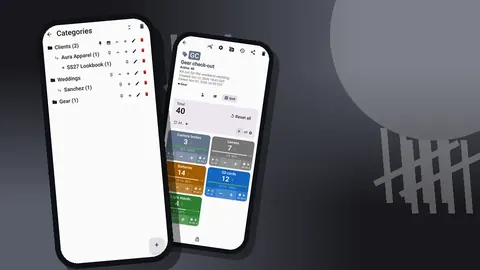
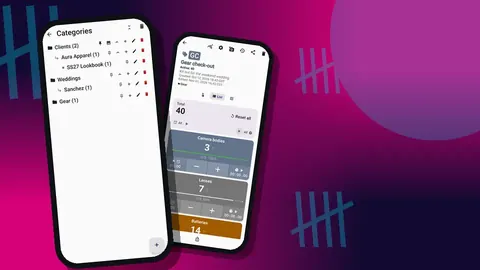
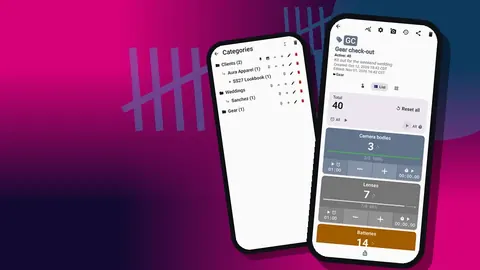
In Counter App she creates a category called "Bags", with a sub-category for each physical bag: "Daily bag", "Lighting case", "Car kit". Categories can nest three levels deep and carry their own colors, so she gives each bag a color that matches its zipper pull. A little silly, she thinks, but it means the screen and the real bag look related.
Inside "Daily bag" she creates counters by type: Bodies, Lenses, Power, Cards, Small stuff. Every item becomes a tag inside its counter. For one-off items like a lens, the value is 1 and the tag works as a record card. For things she owns several of, like batteries, the value is the quantity.
Serials, codes and condition photos
Each tag gets the details she always meant to write down. Serial numbers and purchase months go into the tag notes. Where a lens box still has a barcode, she scans it into the tag with the camera. A couple of older labels refuse to scan, so she types the code instead; the tag does not care which way the code arrived.
Then come the photos. Each tag can hold up to six, and she settles on a pattern: one front shot, one shot of the serial plate, and close-ups of any existing marks. Taking condition photos on a calm Sunday, in good light, feels like an odd use of an afternoon. She suspects she will be glad of it later.
Marking scratches before they matter
Her 70-200 has a small scuff on the hood mount that has been there for years. Rather than relying on memory, she opens the photo in the built-in editor, draws a circle around the scuff with the brush, and adds the date in text. The editor offers six colors and four fonts, plus rotation, which is enough for annotations that will still be readable on someone else's screen.
By evening, the daily bag is done. She stops there on purpose.
One category a week
Over the next month she adds one category each weekend: lighting, support, and finally the dreaded drawer. Each weekend's work is small enough to finish. None of it competes with paid work.
The drawer of adapters
The drawer turns out to be the most useful category of all, precisely because counting it forces decisions. Eleven adapters, six of which fit nothing she still owns. Two cables with connectors she cannot identify. A remote for a camera sold years ago.
The dead items go to a camera club swap shelf, and their counters go to the trash. Deleted counters can be restored from the trash, and deleted categories have their own category trash, which makes her braver about deleting. Clearing dead gear from the list, she realises, is half the value of the whole exercise: the inventory now shows what she can actually use.
The packing ritual
The real change is not the inventory itself. It is the habit the inventory makes possible.
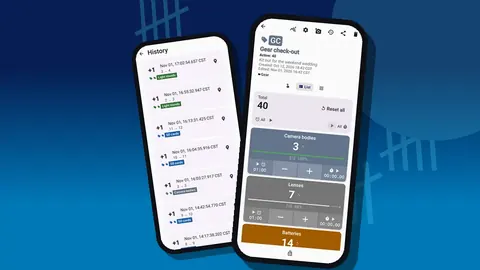
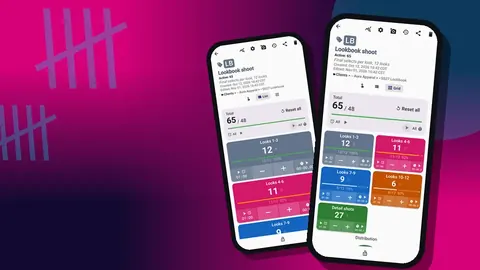
Before each job she opens the counter for the bag she is taking and works through the tags in list or grid view. The night before a big job she sets targets on the consumables: batteries target 6, cards target 4. She resets the tag, counts each battery into the bag with a tap, and the phone vibrates when the target is reached. Counting up to a goal turns packing into something that can be finished rather than something that trails off.
Packing with both hands
On days when she packs with both hands full, she turns on volume-key counting in settings. It is off by default, and once enabled it works in the background and from the lock screen. Press the key, drop a battery in the bag, press again. She maps a soft click to the add key and a different vibration to the subtract key, so she can feel the difference without looking. On her phone the system volume bar still flashes up occasionally, which some devices do, but the count lands regardless.
What the history showed
After a few months, the history log tells Maya things she would not have noticed on her own. Every count is logged with its time, before and after values and the tag.
- Her memory card count drifts down, one card at a time, over several weeks. Cards are being left in readers at clients' offices. She now adds a note to the count whenever a card goes out with a client, and the drift stops.
- The lighting case barely changes from month to month, while the daily bag changes every week. She stops auditing the lighting case so often and spends that time on the bag that actually moves.
- Two items she thinks are lost are simply in the car kit. Adding a typed location to tags that move between bags ("Car", "Studio cupboard") removes that confusion. Location can also be set by GPS or by picking a point on a map, but a typed place name suits gear that moves between bags.
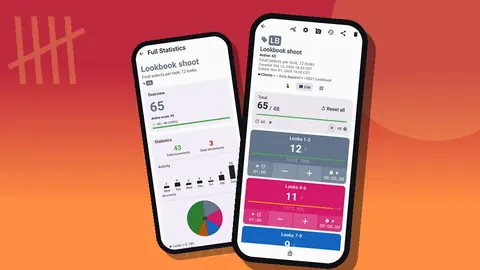
The dashboard's activity chart makes the card drift visible at a glance, without any spreadsheet work.
What happened when the insurer asked for a list?
Later in the year her insurer asks for an updated equipment list. In the old days this meant an evening of digging through receipts and old emails. This time she opens the share screen, exports an HTML page with embedded photos for a readable record and an Excel file for the numbers, adds replacement values in the spreadsheet, and sends both.
She checks with her insurer that the format works for them, and in her case it does. That is worth confirming for your own policy rather than assuming, because insurers differ in what they accept.
She also makes a ZIP backup of the whole inventory with photos and keeps it with her other backups. The backup can include only chosen counters or categories and can compress photos, and an import shows a preview first, with replace, copy or skip for duplicates. She tests a restore on an old phone once, just to know it works.
What didn't change
Not everything improves overnight, and pretending otherwise would make this a worse story. Some weeks she forgets to update the car kit. Once she packs from memory and leaves the reflector behind anyway. The difference is that a quick look at the bag counter on the way out of the door usually catches the gap, and when it does not, she knows exactly which list to fix.
The app also does not make decisions for her. It does not tell her which flash system to sell or whether a lens is worth repairing. It simply makes the facts available at the moment she needs them.
What Maya would tell another photographer
- Start with the bag you use most. A complete small inventory beats an incomplete big one.
- Photograph everything once, on a calm day. Condition photos taken before something breaks are worth far more than photos taken after.
- Make packing the trigger. The inventory stays current because you use it every time you pack, not because you schedule audits.
- Count consumables to a target. Batteries and cards are the items that go missing quietly.
- Delete without fear. Clearing dead gear from the list is half the value, and the trash is there if you change your mind.
- Back it up. A ZIP file with photos on another drive is cheap insurance for the insurance list.
If you want to try the same setup
The step-by-step version of Maya's structure is in the photography gear inventory guide. If, like her, you also want to stop running out of time during sessions, the shot counter for photo shoots applies the same counting habit to the session itself.
Counter App runs on Android 12 and later and works offline for all counting features. It is free to download with no ads; try it free for 3 days, then choose a yearly or monthly plan or a one-time lifetime purchase. Get the app at counterapp.online.
Frequently asked questions
Is Maya, the photographer in this gear story, a real person?
No. Maya is an invented composite built from situations working photographers commonly describe. Every Counter App feature in her story exists in the app.
How long does a photographer need to set up a gear inventory?
That depends on the size of the kit. Finishing one bag in an afternoon and adding one category per weekend, as in this story, keeps each session short.
Can each lens or camera body in a gear inventory have condition photos?
Yes, when each item is a tag. A tag stores up to six photos, which the built-in editor can annotate with a brush, text and rotation.
What happens to a gear counter deleted while clearing out old adapters?
It moves to the trash and can be restored from there. Deleted categories have a separate category trash.
How can a photographer stop memory cards quietly going missing?
Count cards into the bag against a target before each job and add a note whenever a card leaves with a client. The history then exposes any slow downward drift.
Can a photographer update the gear inventory where there is no signal?
Yes. Counting, notes and photos in Counter App do not depend on a connection.