Counter App

Track Photography Rental Equipment Check-Out & Returns
Key takeaways
Photography rental equipment tracking needs a fixed check-out ritual: identify the kit, count its parts, photograph condition, record the renter and return date, then repeat at return. Counter App — Tally & Clicker supports this with part-count targets, scanned case labels, up to six photos per tag and a timestamped history for disputes.
- Most photography rental problems fall into four groups: missing parts, condition disputes, double bookings and slow returns.
- In Counter App — Tally & Clicker, a rental kit tag's target equals its number of parts, so a short return visibly fails to reach the target.
- Condition photos of rental gear are only comparable when taken in the same positions and light at check-out and at return.
- Counter App has no due-date reminders, so active rentals are best pinned, color-coded and reviewed every morning.
Lending or renting out photography gear is easy. Getting it back complete, and in the condition it left, is where things go wrong. The softbox returns without its inner diffuser. A lens comes back with a mark on the front element and the renter is sure it was already there. Two regular clients both believe they have the same strobe kit for Friday. A sync cable disappears into someone's car for a month.
None of this needs rental-house software. It needs a consistent check-out ritual and a record that is easy to show when someone asks, "what did it look like when it left?" This guide sets that up on an Android phone with Counter App, for studios with a small rental side line and for photographers who lend kit to people they trust.
Where do photography rentals go wrong?
Most rental problems fall into four groups, and each needs a slightly different safeguard.
- Missing parts. The main item returns, a small part does not: caps, diffusers, cables, chargers, the pouch. Safeguard: a part count, done the same way out and back.
- Condition disputes. A mark appears and nobody can say when. Safeguard: condition photos taken at check-out, in the same positions as at return.
- Double bookings. Two people think they have the same kit. Safeguard: a status board that shows what is out and until when.
- Slow returns. Kit drifts back late. Safeguard: a daily look at what is out, because the app has no due-date reminder of its own.
The check-out ritual
Whether you rent commercially or just lend kit to regular clients, the ritual is the same five steps:
- Identify the item. Scan the case label or pick the kit from the list.
- Count the parts. Body, caps, battery, charger, strap, bag. Small parts are what go missing.
- Photograph condition. Front, back, serial plate and any existing marks.
- Record who and until when. Renter name, contact, agreed return date, deposit.
- Reverse it on return. Same count, same photo positions, compare.
The value comes from doing it every single time, including for friends. A ritual skipped "just this once" is the one you will need.
Two ways to structure the log
There are two sensible models in Counter App, and many studios combine them.
Item-based. One counter per rentable kit, such as "Strobe kit A" or "70-200 f/2.8 #2", with tags for its parts. The counter's value shows how many parts are present. This suits kits with many components and lets the kit's condition history build up in one place.
Rental-based. One counter per rental job, such as "Rental – 14 Nov – Client K", with a tag for each item that went out. This suits studios that want each rental as a self-contained record to export.
A combined setup puts item counters in a category "Rental fleet" and job counters in a category "Rentals 2026" with sub-categories by month. Categories nest up to three levels, take their own colors and can be pinned, so the current month sits at the top.
What goes on each tag
Each tag can carry the details a rental needs:
- Target. The number of parts that should be present. For a strobe kit with head, reflector, cable and bag, the target is 4. Counting to the target at check-out and again at return is a fast completeness check, and an optional sound or vibration confirms when it is reached.
- Barcode or QR. The code on your case label, scanned with the camera or typed in.
- Notes. Renter, contact, return date, deposit details, anything agreed verbally.
- Photos. Up to six per tag, for condition shots.
- Color. A status signal, for example one color for "out" and another for "in".
The counter itself has a description and a link; use them for your rental terms or a link to the signed agreement.
Case labels and codes
Labelling cases rather than individual items keeps the system simple. Print a QR sticker for each case or pouch, encode a short readable ID such as "STROBE-A", and store the same code on the matching tag. At check-out, a scan confirms you are looking at the right kit, which matters when you own three nearly identical light cases.
If a label is worn or the scanner struggles with a glossy surface, type the code instead. Either way the tag ends up with the same code. Test your label stock with your phone before printing a full sheet.
Condition photos that hold up
Condition photos are only useful if they are comparable. Pick fixed positions for each kind of item and use them every time: a lens gets front element, rear element, barrel and mount; a light gets the head front, the fan side and the cable. Shoot in the same spot with the same light, so differences in the photos are differences in the gear.
The built-in photo editor makes the check-out set clearer. Circle existing scratches with the brush, write the date in text, choose a color that contrasts with the item and rotate any sideways shots. An item that leaves with its existing marks already circled and dated rarely becomes a dispute.
Each tag holds up to six photos. For a kit that goes out often, keep the best check-out set from the last clean return and replace only the shots where something has changed.
Keep the check-out fast
A ritual only survives if it takes less time than the renter is willing to wait. Prepare kit counters in advance, keep tag names short, and use grid view so every part of a kit is visible on one screen. If the kit's photos from the last return are already on the tag, check-out becomes "confirm nothing has changed, photograph anything new". The whole exchange should take a few minutes at the counter, not a quarter of an hour of the renter's time.
If you are handling cases with both hands, volume-key counting helps. It is off by default; once enabled in settings, the volume keys count in the background and on the lock screen, with remappable keys and their own sound or vibration.
On return
Open the same counter. Reset the parts tag, or count down if you prefer, and count the parts again. If the count is short, the tag will not reach its target, which is a clear signal while the renter is still standing in front of you. Take fresh photos in the same positions and compare them with the check-out set.
Add a note to the return count, such as "front element clean, lens hood missing" or "returned a day late, agreed by phone". Then lock the counter once the rental is closed, so nothing changes by accident while the kit is being cleaned and shelved.
How do you see which kit is out right now?
The counter list is your status board, and a few habits make it work:
- Color-code status. One counter color for "out", another for "in". The color shows in both list and grid view.
- Pin active rentals so they sit at the top of the list.
- Name counters with the renter or item, because search works on counter names.
- Filter by date range to see rentals in a given week, and sort by one of six orders when you want the oldest open rental first.
Because there are no due-date reminders, build a small morning habit: glance at the pinned counters and read the notes for today's returns. It takes less time than a reminder app and keeps you looking at the actual record.
The timeline behind every rental
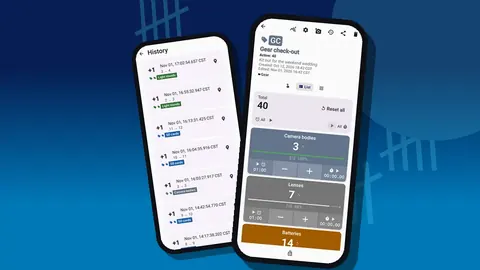
History logs every count with its exact time, the step, the values before and after and the tag, with icons for entries that carry a note, photo or location. For a rental, that gives a clean sequence: parts counted out on this date at this time, counted back on that date, with these notes. When a renter remembers the return differently, the timeline is a neutral reference.
The dashboard adds a quick overview: totals against target, increments against decrements and an activity chart. For a rental fleet, the activity chart shows which kits move most, which is useful when deciding what to buy a second copy of.
What do you do when a renter disputes damage?
A consistent record pays off here. Export the relevant counter as an HTML page with embedded photos, including the Events and Notes sections. The renter can see the condition photos from check-out next to those from the return, with times and your notes. A CSV or Excel export suits studios that track deposits and fees in a spreadsheet.
The record does not settle a dispute by itself, and it is not a legal document. What it does is move the conversation from memory to evidence, which usually shortens it.
A hypothetical example
Illustrative only. A small studio lends a two-light kit to a regular client. At check-out, the kit tag has a target of 6 parts; all six are counted and the tag reaches its target. Four photos are attached, one of them showing an old scuff on a stand, circled and dated. Three days later the kit returns. Five parts are counted, so the tag stays one short. The missing part is a sync cable, which the client finds in their car the next day. The paperwork on each end takes a couple of minutes, and nobody argues about the scuff.
Back up your rental history
Rental records are worth keeping for as long as disputes or tax questions could arise. Make a regular ZIP backup with photos. You can include only the rental categories for a smaller file and compress photos if space is tight. On restore, an import preview shows the contents and lets you replace, copy or skip duplicates. Data is stored on the phone, with no account and no Counter App cloud, so the ZIP backup is your own copy.
For the studio-side view of the same equipment, see studio equipment tracking. To build the underlying list of what you own, start with the gear inventory guide.
It works on Android 12 and newer and is free to download with no ads; try it free for 3 days, then choose a yearly or monthly plan or a one-time lifetime purchase. Get the app at counterapp.online.
Frequently asked questions
How do I record a rental lens's condition before it leaves the studio?
Attach up to six photos to its tag, in fixed positions, and circle existing marks with the photo editor. The check-out count is timestamped in history.
Does Counter App send reminders for overdue rental returns?
No. Write the return date in the tag or counter notes, pin active rentals and use the counter list's date-range filter to review them.
How can a studio confirm every part of a rental kit came back?
Set the kit tag's target to its part count and count the parts again on return. A tag that stays below target means something is missing.
Can a renter receive a copy of the check-out record?
Export the counter as an HTML report with embedded photos, or as CSV or Excel, and send the file through your usual channel.
Can labelled light cases be scanned at rental check-out?
Yes. Store each case's QR or barcode on its tag, then scan it at the counter to confirm the right kit; typing the code works when a label is worn.
Is a Counter App rental record a legal document?
No. It is a consistent, timestamped record with photos that moves a dispute from memory to evidence, but it does not settle one by itself.